
本文介绍SIP室内电话机快捷键的定义和使用,覆盖记忆键、线路键、功能键、DTMF、URL、BLF List、组播和Action URL等配置,适用于i51W、i52W、i53W、i56A室内机。
本文对 i 系列室内机可配置的快捷键定义和使用做详细介绍。
所有 i 系列室内机均适用:i51W、i52W、i53W、i56A。
① i 系列室内机,POE 交换机或者直流电源为设备供网供电;
② 调试电脑一台,并把电脑接入交换机下,保证电脑与室内机网络互通。
POE 交换机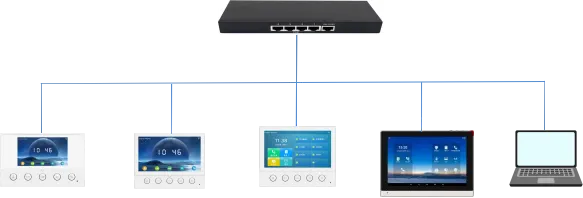
i51W i52W i53W i56A 电脑
按照功能划分,快捷按键可以分为以下几个大类:
Memory Key
Line
Event Key
DTMF
URL
BLF List Key
MCAST Paging/MCAST Listening
Action URL
XML Browser
Application
注:因为各个室内机的产品定位以及系统方案不同,快捷键分类上会有些不同,如 i51W/i52W/i53W 无 XML 浏览器和应用分类,i51W/i52W 无 MCAST Listening 和 BLF List Key。
按照具体功能划分,记忆键可以分为以下几个子类型:
1. None
2. BLF related configuration
3. Presence
4. Voice Mail
5. Speed Dial
6. Intercom
7. Call Park
8. Call Forward
i51W 和 i52W 因为屏幕不可触摸,记忆键的子类型和功能键的子类型可定义数量与 i53W 和 i56A 不同。i51W 和 i52W 记忆键只可定义为快速拨号和对讲机,功能键只可定义为免打扰、免提、确认、结束、对讲机。
3.1.1. BLF related configuration
功能描述: 该功能用于执行对应的 BLF can indicate the status of a subscribed extension and can pick up the call when that extension is ringing 场景,适合在 SIP 线路、通话处理、联系人访问或业务功能中快速操作。
配置项: 类型: Memory Key
值: BLF related configuration / DSS value
线路: SIP account used for outgoing calls or subscription
子类型: BLF related configuration
抢接号码: optional server pickup code
使用方法: 该功能用于执行对应的 Press the configured key in standby, ringing or call status to execute the assigned shortcut operation 场景,适合在 SIP 线路、通话处理、联系人访问或业务功能中快速操作。
3.1.2. Presence
功能描述: 该功能用于执行对应的 Presence shows line status through the indicator and can also show whether the other party is online 场景,适合在 SIP 线路、通话处理、联系人访问或业务功能中快速操作。
配置项: 类型: Memory Key
值: Presence / DSS value
线路: SIP account used for outgoing calls or subscription
子类型: Presence
抢接号码: optional server pickup code
使用方法: 该功能用于执行对应的 Press the configured key in standby, ringing or call status to execute the assigned shortcut operation 场景,适合在 SIP 线路、通话处理、联系人访问或业务功能中快速操作。
3.1.3. Voice Mail
功能描述: 该功能用于执行对应的 Voice Mail is used to listen to messages 场景,适合在 SIP 线路、通话处理、联系人访问或业务功能中快速操作。
配置项: 类型: Memory Key
值: Voice Mail / DSS value
线路: SIP account used for outgoing calls or subscription
子类型: Voice Mail
使用方法: 该功能用于执行对应的 Press the configured key in standby, ringing or call status to execute the assigned shortcut operation 场景,适合在 SIP 线路、通话处理、联系人访问或业务功能中快速操作。
3.1.4. Speed Dial
功能描述: 该功能用于执行对应的 Speed Dial is used for frequently dialed or hard-to-remember numbers 场景,适合在 SIP 线路、通话处理、联系人访问或业务功能中快速操作。
配置项: 类型: Memory Key
值: Speed Dial / DSS value
线路: SIP account used for outgoing calls or subscription
子类型: Speed Dial
使用方法: 该功能用于执行对应的 Press the configured key in standby, ringing or call status to execute the assigned shortcut operation 场景,适合在 SIP 线路、通话处理、联系人访问或业务功能中快速操作。
3.1.5. Intercom
功能描述: 该功能用于执行对应的 Intercom enables automatic answering and direct conversation with the configured number 场景,适合在 SIP 线路、通话处理、联系人访问或业务功能中快速操作。
配置项: 类型: Memory Key
值: Intercom / DSS value
线路: SIP account used for outgoing calls or subscription
子类型: Intercom
使用方法: 该功能用于执行对应的 Press the configured key in standby, ringing or call status to execute the assigned shortcut operation 场景,适合在 SIP 线路、通话处理、联系人访问或业务功能中快速操作。
3.1.6. Call Park
功能描述: 该功能用于执行对应的 Call Park temporarily parks a call on the server, so the user can retrieve the call from another location by dialing the announced Call Park number 场景,适合在 SIP 线路、通话处理、联系人访问或业务功能中快速操作。
配置项: 类型: Memory Key
值: Call Park / DSS value
线路: SIP account used for outgoing calls or subscription
子类型: Call Park
使用方法: 该功能用于执行对应的 Press the configured key in standby, ringing or call status to execute the assigned shortcut operation 场景,适合在 SIP 线路、通话处理、联系人访问或业务功能中快速操作。
3.1.7. Call Forward
功能描述: 该功能用于执行对应的 Call Forward transfers an incoming call to the configured destination number with one key 场景,适合在 SIP 线路、通话处理、联系人访问或业务功能中快速操作。
配置项: 类型: Memory Key
值: Call Forward / DSS value
线路: SIP account used for outgoing calls or subscription
子类型: Call Forward
使用方法: 该功能用于执行对应的 Press the configured key in standby, ringing or call status to execute the assigned shortcut operation 场景,适合在 SIP 线路、通话处理、联系人访问或业务功能中快速操作。
按下线路键,若该线路未被注册,则进入线路设置模式;若线路已注册,则进入拨号模式,可以输入号码进行呼叫。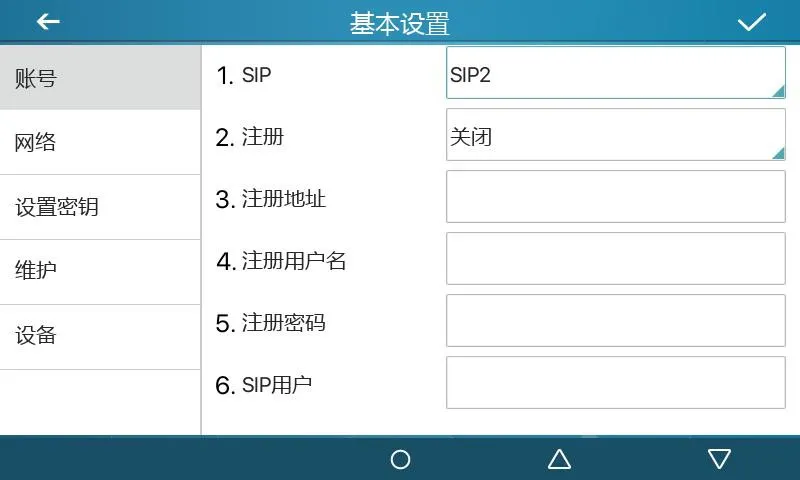
图 1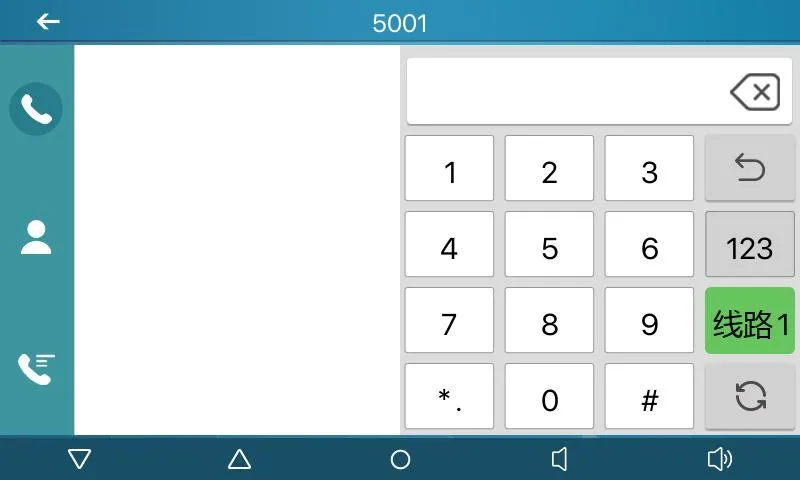
图 2
功能描述: 通过子类型设定为具体的专用功能键。根据对应子类型会有不同的功能和使用方法。
配置项: 类型: Event Key
子类型: selected function type
使用方法:
3.3.1 None:
无任何功能。
3.3.2 Voice Mail:
该功能用于执行对应的 Checks voice mail information for all SIP lines and can call the mailbox of the current line when MWI Number is configured 场景,适合在 SIP 线路、通话处理、联系人访问或业务功能中快速操作。
3.3.3 Do-not-disturb:
该功能用于执行对应的 Enables do-not-disturb for the whole device or for a selected SIP line 场景,适合在 SIP 线路、通话处理、联系人访问或业务功能中快速操作。
3.3.4 Call Hold:
该功能用于执行对应的 Places the current call on hold like a physical Hold key 场景,适合在 SIP 线路、通话处理、联系人访问或业务功能中快速操作。
3.3.5 Transfer:
该功能用于执行对应的 Transfers the current call like a Transfer key or Xfer softkey 场景,适合在 SIP 线路、通话处理、联系人访问或业务功能中快速操作。
3.3.6 Phonebook:
该功能用于执行对应的 Opens the contact directory 场景,适合在 SIP 线路、通话处理、联系人访问或业务功能中快速操作。
3.3.7 Redial:
该功能用于执行对应的 Redials the last outgoing number using the previous line 场景,适合在 SIP 线路、通话处理、联系人访问或业务功能中快速操作。
3.3.8 Pick up:
该功能用于执行对应的 Answers an incoming call that is ringing on another phone after the ringing phone number is entered 场景,适合在 SIP 线路、通话处理、联系人访问或业务功能中快速操作。
3.3.9 Join:
该功能用于执行对应的 Allows the test phone to join an existing call after entering the target phone number and pressing DSS 场景,适合在 SIP 线路、通话处理、联系人访问或业务功能中快速操作。
3.3.10 Call Forward:
该功能用于执行对应的 Opens call forwarding settings in standby mode 场景,适合在 SIP 线路、通话处理、联系人访问或业务功能中快速操作。
3.3.11 Call Logs:
该功能用于执行对应的 Opens call history and call record information 场景,适合在 SIP 线路、通话处理、联系人访问或业务功能中快速操作。
3.3.12 Flash:
该功能用于执行对应的 Holds the current call and opens a new dialing state with dial tone 场景,适合在 SIP 线路、通话处理、联系人访问或业务功能中快速操作。
3.3.13 Memo:
该功能用于执行对应的 Opens the memo application for note management 场景,适合在 SIP 线路、通话处理、联系人访问或业务功能中快速操作。
3.3.14 Headset:
该功能用于执行对应的 Works like the physical headset key for answering and hanging up calls 场景,适合在 SIP 线路、通话处理、联系人访问或业务功能中快速操作。
3.3.15 Release:
该功能用于执行对应的 Exits the LCD menu or hangs up all calls and returns to standby 场景,适合在 SIP 线路、通话处理、联系人访问或业务功能中快速操作。
3.3.16 Lock phone:
该功能用于执行对应的 Locks the phone from standby mode 场景,适合在 SIP 线路、通话处理、联系人访问或业务功能中快速操作。
3.3.17 SMS:
该功能用于执行对应的 Opens the SMS interface for sending, receiving and browsing messages 场景,适合在 SIP 线路、通话处理、联系人访问或业务功能中快速操作。
3.3.18 Call Back:
该功能用于执行对应的 Calls back the last incoming number after off-hook 场景,适合在 SIP 线路、通话处理、联系人访问或业务功能中快速操作。
3.3.19 Hide DTMF:
该功能用于执行对应的 Opens the setting mode for DTMF hidden display 场景,适合在 SIP 线路、通话处理、联系人访问或业务功能中快速操作。
3.3.20 Intercom:
该功能用于执行对应的 Enables Intercom mode and automatic answering when no other call is active 场景,适合在 SIP 线路、通话处理、联系人访问或业务功能中快速操作。
3.3.21 Group Listening:
该功能用于执行对应的 Enables group listening during handset or headset calls; audio is played, while the microphone does not collect audio 场景,适合在 SIP 线路、通话处理、联系人访问或业务功能中快速操作。
3.3.22 Prefix:
该功能用于执行对应的 Adds the configured outside-line prefix after off-hook, so users do not need to remember it 场景,适合在 SIP 线路、通话处理、联系人访问或业务功能中快速操作。
3.3.23 Hot Desking:
该功能用于执行对应的 Clears all SIP configurations after the configured DSS key is pressed and OK is confirmed 场景,适合在 SIP 线路、通话处理、联系人访问或业务功能中快速操作。
3.3.24 Agent:
该功能用于执行对应的 Opens the Agent interface 场景,适合在 SIP 线路、通话处理、联系人访问或业务功能中快速操作。
3.3.25 End:
该功能用于执行对应的 Performs the End function on the call interface 场景,适合在 SIP 线路、通话处理、联系人访问或业务功能中快速操作。
3.3.26 Disposition:
该功能用于执行对应的 Broadsoft Call Center function that sends Disposition Code Info during and after calls 场景,适合在 SIP 线路、通话处理、联系人访问或业务功能中快速操作。
3.3.27 Escalate:
该功能用于执行对应的 Broadsoft Call Center function that sends SIP Info and selects a Supervisor automatically or by configured number 场景,适合在 SIP 线路、通话处理、联系人访问或业务功能中快速操作。
3.3.28 Trace:
该功能用于执行对应的 Broadsoft function similar to Disposition, supporting information sending during and after calls 场景,适合在 SIP 线路、通话处理、联系人访问或业务功能中快速操作。
3.3.29 Handfree:
该功能用于执行对应的 Enters hands-free mode 场景,适合在 SIP 线路、通话处理、联系人访问或业务功能中快速操作。
3.3.30 Answer Key:
该功能用于执行对应的 Answers the incoming call 场景,适合在 SIP 线路、通话处理、联系人访问或业务功能中快速操作。
3.3.31 Private Hold:
该功能用于执行对应的 Broadsoft function that prevents other users from retrieving the held call 场景,适合在 SIP 线路、通话处理、联系人访问或业务功能中快速操作。
3.3.32 Local Contacts:
该功能用于执行对应的 Opens the local contacts interface 场景,适合在 SIP 线路、通话处理、联系人访问或业务功能中快速操作。
3.3.33 LDAP Group:
该功能用于执行对应的 Accesses the LDAP network phonebook when LDAP phonebook is enabled 场景,适合在 SIP 线路、通话处理、联系人访问或业务功能中快速操作。
3.3.34 XML Group:
该功能用于执行对应的 Accesses the selected XML network phonebook when XML phonebook is enabled 场景,适合在 SIP 线路、通话处理、联系人访问或业务功能中快速操作。
3.3.35 Broadsoft Group:
该功能用于执行对应的 Accesses the Broadsoft network phonebook when it is enabled 场景,适合在 SIP 线路、通话处理、联系人访问或业务功能中快速操作。
3.3.36 Record:
该功能用于执行对应的 Starts call recording when the phone has been configured for recording 场景,适合在 SIP 线路、通话处理、联系人访问或业务功能中快速操作。
3.3.37 Auto Headset:
该功能用于执行对应的 Enables or disables headset answering; the DSS key stays steady green 场景,适合在 SIP 线路、通话处理、联系人访问或业务功能中快速操作。
功能描述: 可以用于快速二次拨号,无需记忆二次拨号的内容。通话中按下此键,即可按序一次将所配置的号码序列发送到远端。
配置项: 类型: DTMF
值: DTMF secondary dialing key sequence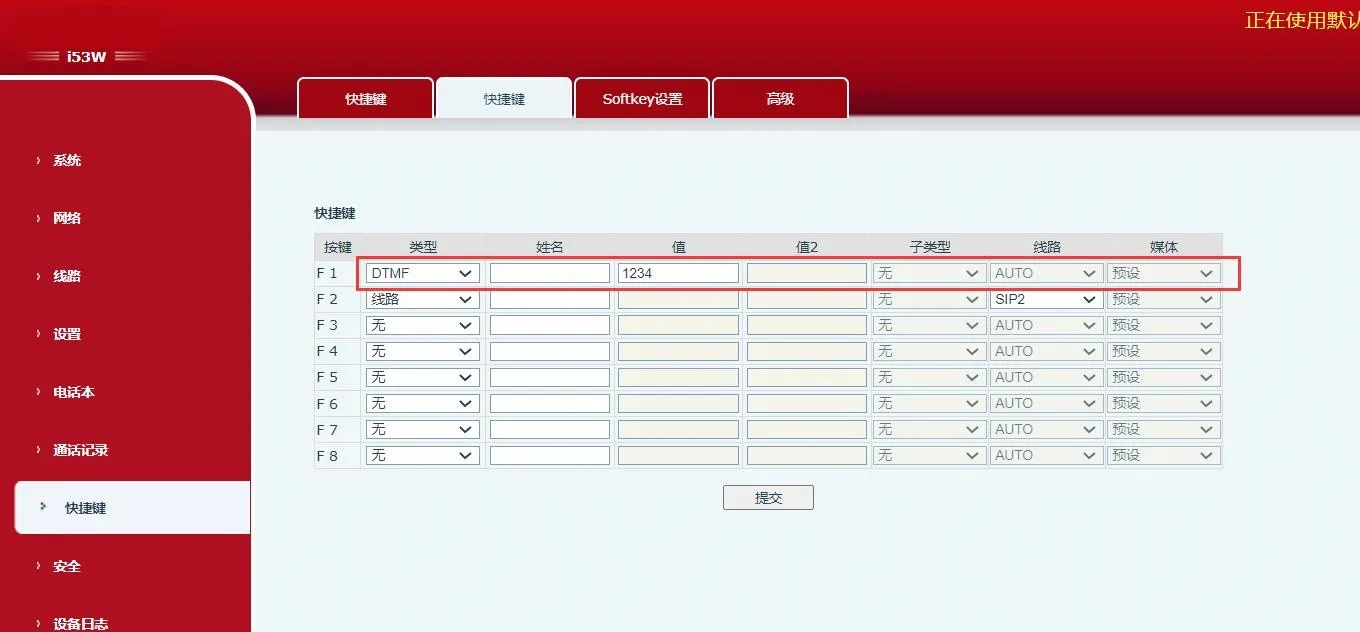 图 3
图 3
功能描述: 可以通过按下该键访问远程所设置的 URL,前提是 URL 有效。
配置项: 类型: URL
值: complete remote URL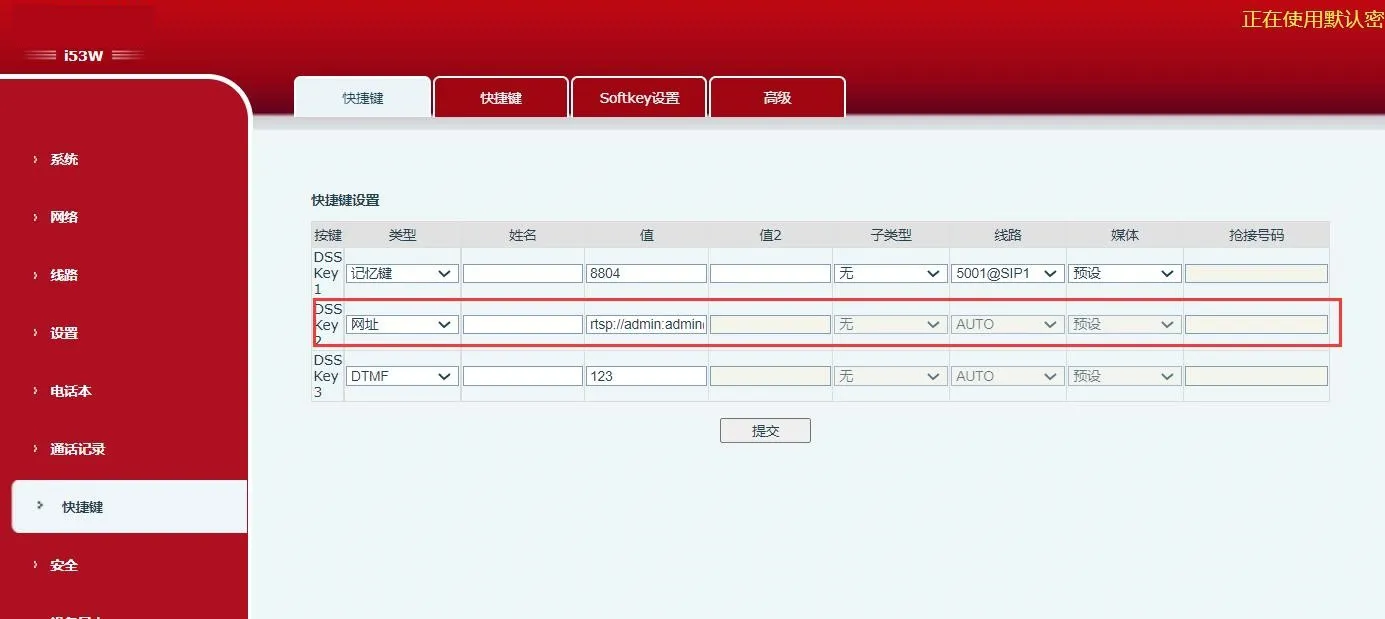 图 4
图 4
功能描述: 需要配合服务器使用。传统 BLF 是一个号码对应一个 Subscribe,号码较多时可能阻塞。BLF List Key 在服务器端将号码放入组里,话机用组 URL 统一订阅,解析 Notify 消息并把状态显示在按键 LED 上。
配置项: 类型: BLF List Key
使用方法: server automatically delivers subscribed number list to DSS keys.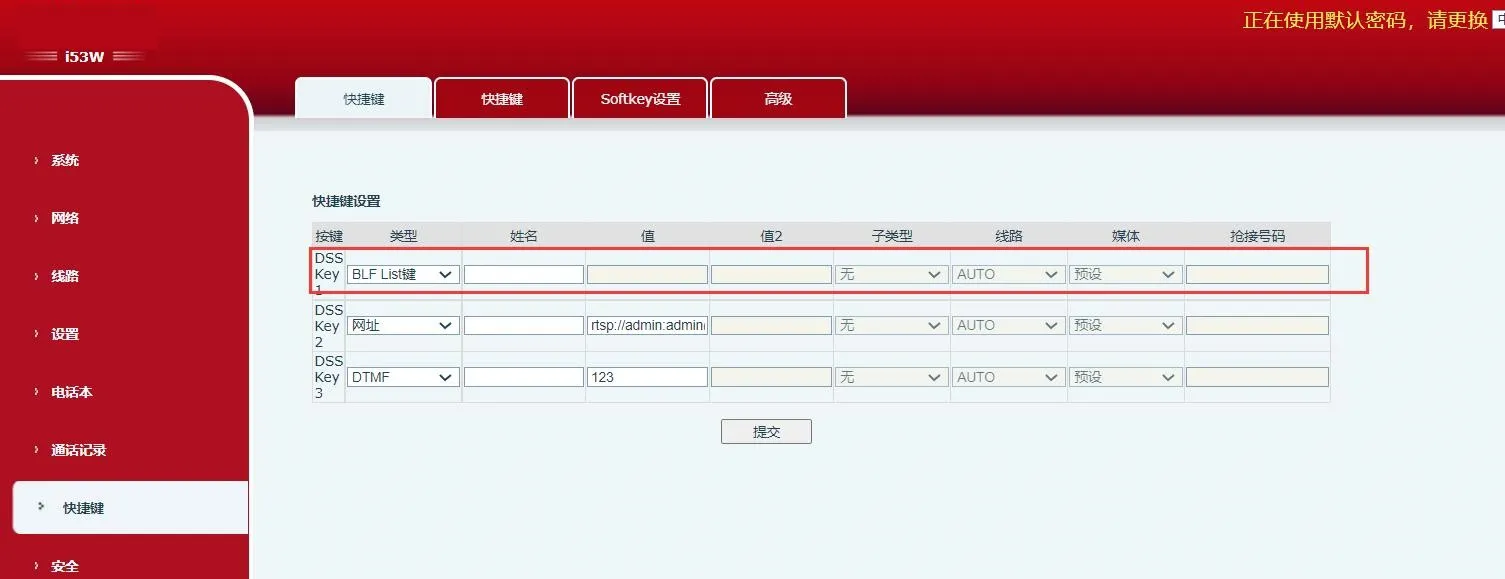 图 5
图 5
功能描述: 设置组播地址和语音编码后,按下此键可以发出组播 RTP 流。再按则可结束组播并挂机。
配置项: 类型: MCAST Paging / MCAST Listening
值: multicast listening address and port
子类型: RTP audio codec used by sender and receiver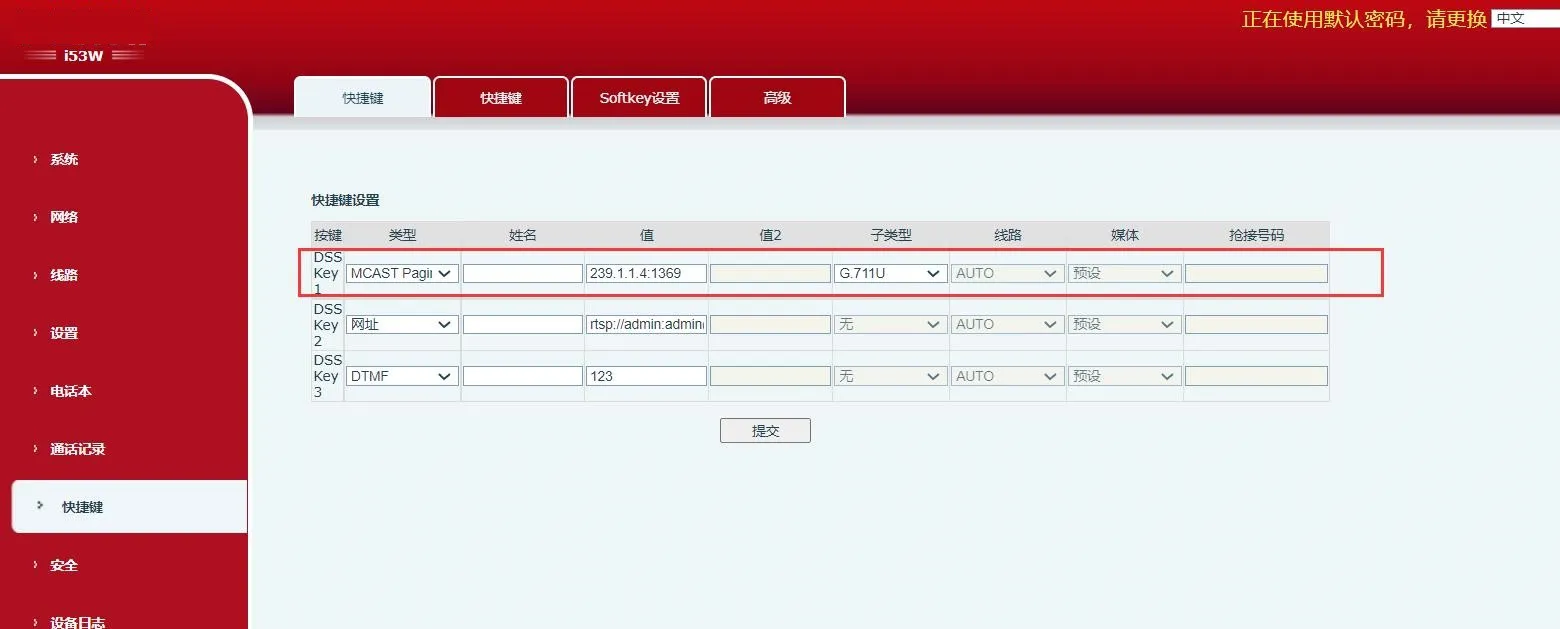
图 6
功能描述: 配置的 URL 支持 ¥ 形式的变量参数。用户按下 DSS 按键后,系统发起 HTTP GET 或 POST 请求。
配置项: 类型: Action URL
值: valid URL
子类型: POST or GET