

百科全书
2026-08-27 17:35:14
NGAP如何在N2上串联注册、PDU会话与切换?
说明5G N2接口如何在gNB与AMF之间基于SCTP承载NGAP,以及NG Setup、NAS传输、UE上下文、PDU会话资源、寻呼和切换如何串联成完整的信令链路。

贝克电信

NGAP如何在N2上串联注册、PDU会话与切换?

在抓取5G注册信令时,同一条N2连接上经常会看到这样的顺序:先出现Initial UE Message,随后是Uplink NAS Transport和Downlink NAS Transport,然后进入Initial Context Setup;当UE真正开始建立数据连接时,又会出现PDU Session Resource Setup。理解每一条消息本身并不算困难,更难的是弄清它们为什么按这个顺序出现,以及NGAP在整个5G控制面中究竟承担什么作用。可以把N2理解为gNB与AMF之间持续存在的控制通道:网络节点先建立关系,然后创建UE上下文,之后才为PDU会话准备RAN资源。当UE发生移动、进入空闲态,或者业务参数发生变化时,还会触发其他NGAP流程。

N2接口究竟做什么?

N2是gNB与AMF之间的控制面接口,使用NGAP(NG Application Protocol,NG应用协议)。从功能上看,它与4G中的S1-MME接口有一定相似之处,但工作在5G系统架构内。

SCTP作为N2的传输层。NGAP运行在SCTP之上,而UE与5G核心网之间交换的NAS消息可通过NGAP在gNB和AMF之间承载。因此,典型的N2协议栈可以这样理解:IP负责提供gNB与AMF之间的网络可达性,SCTP负责建立N2传输关联,NGAP承载N2控制流程及参数,需要时5G NAS则以NAS-PDU的形式进行传输。

NGAP本身不承载UE的常规用户面流量。实际用户数据通常通过N3用户面传输。N2负责资源建立、UE上下文管理、NAS信令传输和移动性协调等控制功能。从功能上说,N2支持与PDU会话相关的NG-RAN资源的建立、维护和释放,同时也参与UE上下文管理、移动性管理、NAS信令传输和用户面资源控制。
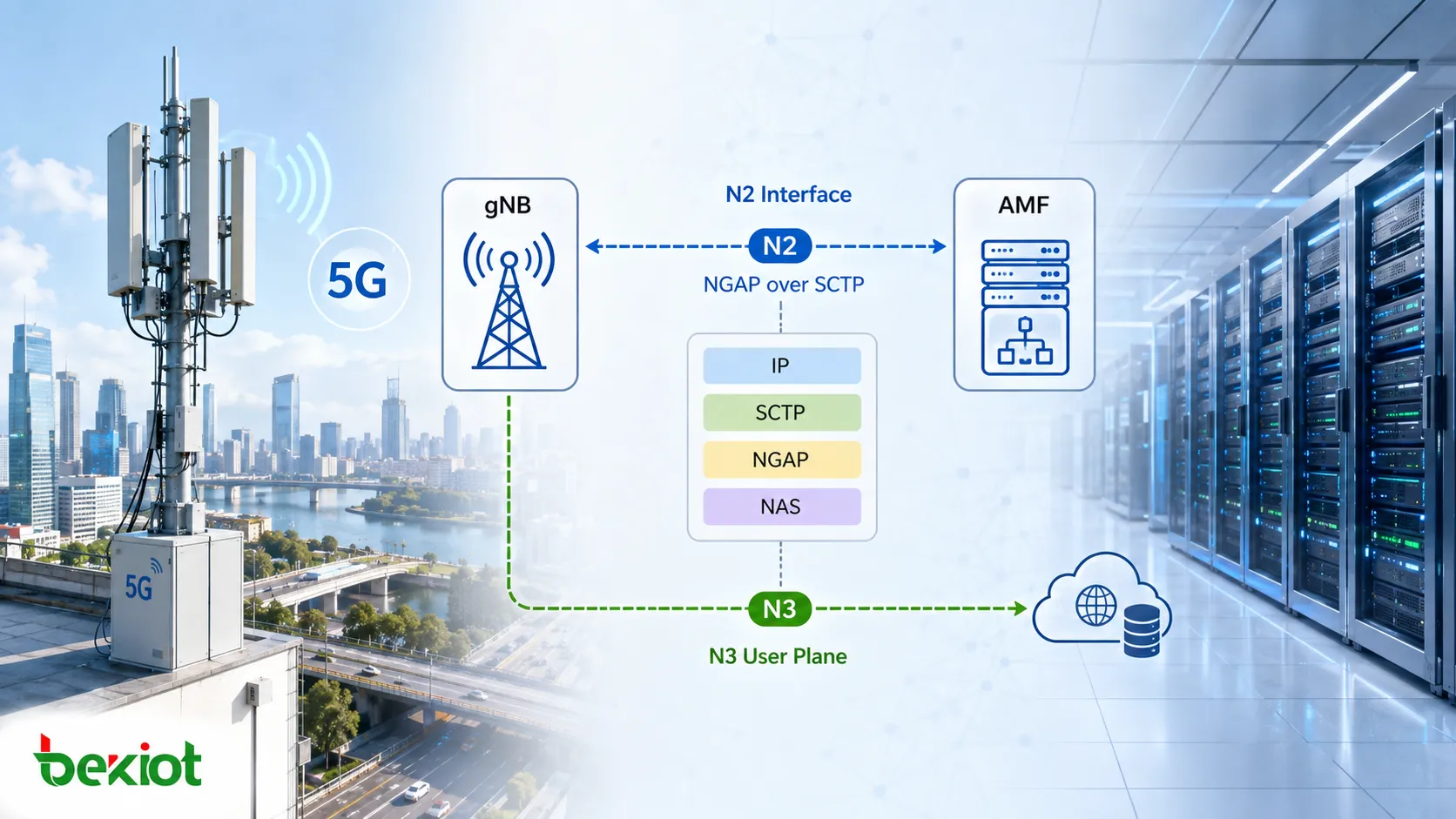
5G N2接口通过SCTP和NGAP连接gNB与AMF,并承载NAS信令和UE控制面流程

为什么NGAP流程要分为UE关联流程和非UE关联流程?

初学NGAP时,如果直接进入几十种流程和消息名称,很快就会变成纯记忆练习。更实用的做法是先判断该流程是否与某个特定UE相关。

UE关联流程围绕特定用户的上下文、会话或移动状态运行,例如PDU会话资源管理、UE上下文管理、切换、寻呼、NAS传输、位置上报以及UE无线能力等流程。相比之下,非UE关联流程主要用于维护gNB与AMF之间的节点级关系,典型示例包括NG Setup、RAN Configuration Update、AMF Configuration Update、NG Reset、AMF Status Indication以及Overload Start/Stop。

这种区分在排查抓包问题时非常有用。如果整个gNB下的用户都受影响,应先检查SCTP、NG Setup、Reset、AMF状态或过载处理等节点级流程。如果只有一个UE受影响,则应沿着该UE的NGAP ID、NAS传输消息、上下文流程以及PDU会话资源信令继续排查。

NGAP流程还可以根据是否需要响应分为Class 1和Class 2。Class 1流程通常包含Request和Response,也可能包含Failure结果;Class 2流程不要求对端返回流程级响应。在实际故障排查中,与其死记每条NGAP消息属于哪一类,不如先判断该流程是否应当产生成功或失败的结果。

N2如何从gNB启动到UE注册逐步建立状态?

在任何UE出现之前,gNB首先要解决的并不是用户注册,而是确认自己能否与AMF正常通信。

第一步通常是NG Setup。gNB与AMF之间的SCTP关联建立后,gNB发送NG Setup Request;如果AMF接受连接,则返回NG Setup Response。在AMF池部署中,gNB可能需要与多个AMF建立N2关系,并获取后续AMF选择所需的信息。此时建立的只是节点级关系,还不存在具体的UE上下文。

当UE开始注册时,信令进入下一层级。gNB收到UE最初的NAS消息后,可以通过Initial UE Message转发给AMF。此后UE与AMF之间的NAS信令通常通过N2上的Uplink NAS Transport和Downlink NAS Transport承载。需要注意的是,gNB不必解析全部NAS业务逻辑。对于大量NAS信令,它的主要职责是识别正确的UE上下文,并把NAS-PDU送到对应的AMF。

随着注册继续进行,AMF还需要gNB建立RAN侧的UE上下文,这时会出现Initial Context Setup Request和Initial Context Setup Response。Initial Context Setup Request可以携带Allowed NSSAI、GUAMI、UE Security Capabilities、Mobility Restriction List和NAS-PDU等重要的UE相关信息。到了这一阶段,gNB已经不再只是转发NAS信令,而是开始建立继续为该UE提供服务所需的状态。

从NG Setup、Initial UE Message、NAS Transport到Initial Context Setup的典型5G N2信令顺序

UE开始使用数据时,NGAP如何建立PDU会话资源?

注册成功并不意味着UE所需的全部用户面资源已经就绪。当UE需要访问数据网络并建立PDU会话时,N2还要参与准备相应的RAN资源。

关键流程之一是PDU Session Resource Setup。AMF向gNB发送PDU Session Resource Setup Request。该消息把与PDU会话及其QoS Flow相关的信息传递给NG-RAN,例如PDU Session ID、S-NSSAI、用户面隧道信息和QoS Flow List。随后gNB根据本地条件分配所需的无线侧资源,例如为QoS Flow配置必要的DRB,并准备N3用户面连接。

资源分配完成后,gNB向AMF发送PDU Session Resource Setup Response,说明哪些资源已成功建立。响应中可以包含gNB的用户面信息以及成功接纳的QoS Flow。

这里很容易混淆N1、N2和N3的作用。N1向UE承载NAS层的PDU会话信息;N2负责协调gNB必须建立的RAN及用户面资源;N3则在这些资源准备完成后承载实际的用户面流量。

因此,排查PDU会话建立失败时,不能在NAS层返回Accept消息后就停止。如果N2上的PDU Session Resource Setup流程没有成功完成,UE可能已经收到会话参数,但用户面仍然无法工作。

PDU会话建立后,N2仍会继续工作

PDU会话激活后,NGAP并不会停止工作。只要UE仍在网络中,状态或业务条件的变化都可能触发新的N2流程。

当UE移动到另一个gNB时,可能触发基于N2或Xn的切换。N2切换可能涉及Handover Required、Handover Request、Handover Request Acknowledge、Handover Command和Handover Notify。新路径建立后,还可能出现Path Switch Request及其响应,同时释放源gNB上的旧UE上下文。

如果UE处于空闲态且下行流量到达,AMF可以通过NGAP向NG-RAN发送Paging消息,随后RAN执行无线侧寻呼流程。Paging是典型的单向NGAP流程。如果网络需要调整QoS或其他RAN资源,可触发PDU Session Resource Modify;当会话不再需要时,则使用PDU Session Resource Release。因此,PDU会话的N2生命周期不仅包括Setup,还包括Modify、Release、Notify以及相关Indication流程。

除UE相关业务流程外,工程人员还可能看到NG Reset、Error Indication、Overload Start、Overload Stop、AMF Status Indication以及配置更新等接口管理消息。这些消息对于判断问题只影响单个UE,还是反映N2节点关系发生更广泛的变化尤其有用。
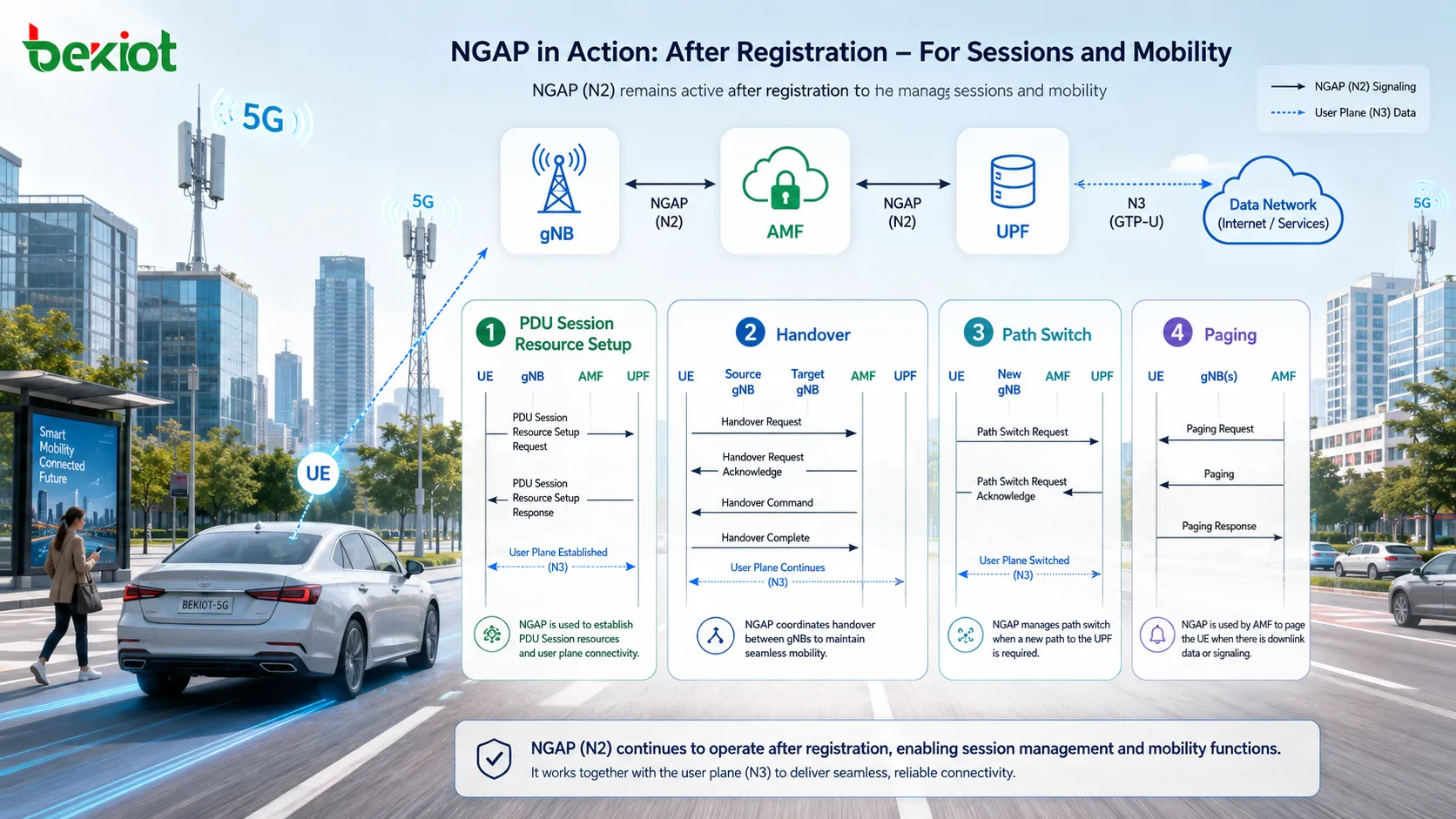
UE接入后,NGAP处理切换、Path Switch、Paging、PDU会话资源修改与释放以及接口管理

排查NGAP抓包时,最佳顺序是什么?

NGAP包含大量消息,但实际故障排查并不需要从头到尾逐条检查3GPP消息列表。更好的方法是按照网络状态建立的顺序进行分析。

第一步是验证SCTP。如果gNB与AMF之间的Transport Network Layer Association没有正确建立,那么继续分析后续应出现的NGAP业务流程意义不大。

第二步是检查NG Setup,确认节点级N2关系正常。如果NG Setup已经失败,通常就没有必要直接跳到UE注册流程排查。

第三步是识别具体UE。UE关联的NGAP消息通常包含相关的UE-NGAP-ID值。抓包分析应沿时间顺序跟踪同一组UE标识,而不是只按消息类型过滤。

第四步是确认NAS信令传输是否正常。检查Initial UE Message、Uplink NAS Transport和Downlink NAS Transport是否形成连续序列。如果NAS-PDU已经到达AMF但之后没有响应,排查方向与gNB从一开始就没有把NAS消息送出去的情况完全不同。

第五步是检查UE上下文建立。如果注册已经进入Initial Context Setup阶段,应检查Request中的参数,并确认Response是否成功完成。

第六步是检查PDU会话资源。如果UE已经注册但无法访问数据网络,应重点查看PDU Session Resource Setup Request/Response,以及返回的PDU会话和QoS Flow资源结果。

如果问题发生在移动过程中,应把排查重点转向Handover、Path Switch以及旧UE上下文的释放;如果空闲态UE无法被下行流量唤起,则重点检查Paging。

按照SCTP → NG Setup → UE识别 → NAS → UE上下文 → PDU会话 → 移动性这条链路进行排查,通常比在实际工程中死记几十个NGAP消息名称有效得多。

常见问题

NGAP与5G NAS是什么关系?

NGAP是gNB与AMF之间N2接口上使用的应用层协议,而NAS承载UE与5G核心网之间的控制信令。许多NAS消息会作为NAS-PDU封装在NGAP消息中,由gNB在UE与AMF之间转发,因此这两个协议工作在不同层级。

N2接口会承载UE的互联网流量吗?

不会。N2不是UE数据的常规用户面通道,它承载的是控制面信令。用户流量通常通过N3在gNB与UPF之间传输,而NGAP负责告诉RAN需要建立、修改或释放哪些相关资源。

NG Setup成功是否意味着UE一定能正常注册?

不意味着。NG Setup只建立gNB与AMF之间的节点级N2关系。当具体UE接入后,Initial UE Message、NAS传输、UE上下文建立以及后续PDU会话资源流程仍需成功完成。

为什么排查NGAP时不能只依赖消息类型过滤?

单个gNB可以同时处理多个UE,同一种NGAP消息类型可能针对不同用户反复出现。只按消息名称过滤很容易把互不相关的流程混在一起。针对单个UE的排查应结合UE-NGAP-ID值、消息时间以及相关NAS或PDU会话上下文。


推荐产品
目录
客服 电话
We use cookie to improve your online experience. By continuing to browse this website, you agree to our use of cookie.

Cookies

This Cookie Policy explains how we use cookies and similar technologies when you access or use our website and related services. Please read this Policy together with our Terms and Conditions and Privacy Policy so that you understand how we collect, use, and protect information.

By continuing to access or use our Services, you acknowledge that cookies and similar technologies may be used as described in this Policy, subject to applicable law and your available choices.

Updates to This Cookie Policy

We may revise this Cookie Policy from time to time to reflect changes in legal requirements, technology, or our business practices. When we make updates, the revised version will be posted on this page and will become effective from the date of publication unless otherwise required by law.

Where required, we will provide additional notice or request your consent before applying material changes that affect your rights or choices.

What Are Cookies?

Cookies are small text files placed on your device when you visit a website or interact with certain online content. They help websites recognize your browser or device, remember your preferences, support essential functionality, and improve the overall user experience.

In this Cookie Policy, the term “cookies” also includes similar technologies such as pixels, tags, web beacons, and other tracking tools that perform comparable functions.

Why We Use Cookies

We use cookies to help our website function properly, remember user preferences, enhance website performance, understand how visitors interact with our pages, and support security, analytics, and marketing activities where permitted by law.

We use cookies to keep our website functional, secure, efficient, and more relevant to your browsing experience.

Categories of Cookies We Use

Strictly Necessary Cookies

These cookies are essential for the operation of the website and cannot be disabled in our systems where they are required to provide the service you request. They are typically set in response to actions such as setting privacy preferences, signing in, or submitting forms.

Without these cookies, certain parts of the website may not function correctly.

Functional Cookies

Functional cookies enable enhanced features and personalization, such as remembering your preferences, language settings, or previously selected options. These cookies may be set by us or by third-party providers whose services are integrated into our website.

If you disable these cookies, some services or features may not work as intended.

Performance and Analytics Cookies

These cookies help us understand how visitors use our website by collecting information such as traffic sources, page visits, navigation behavior, and general interaction patterns. In many cases, this information is aggregated and does not directly identify individual users.

We use this information to improve website performance, usability, and content relevance.

Targeting and Advertising Cookies

These cookies may be placed by our advertising or marketing partners to help deliver more relevant ads and measure the effectiveness of campaigns. They may use information about your browsing activity across different websites and services to build a profile of your interests.

These cookies generally do not store directly identifying personal information, but they may identify your browser or device.

First-Party and Third-Party Cookies

Some cookies are set directly by our website and are referred to as first-party cookies. Other cookies are set by third-party services, such as analytics providers, embedded content providers, or advertising partners, and are referred to as third-party cookies.

Third-party providers may use their own cookies in accordance with their own privacy and cookie policies.

Information Collected Through Cookies

Depending on the type of cookie used, the information collected may include browser type, device type, IP address, referring website, pages viewed, time spent on pages, clickstream behavior, and general usage patterns.

This information helps us maintain the website, improve performance, enhance security, and provide a better user experience.

Your Cookie Choices

You can control or disable cookies through your browser settings and, where available, through our cookie consent or preference management tools. Depending on your location, you may also have the right to accept or reject certain categories of cookies, especially those used for analytics, personalization, or advertising purposes.

Please note that blocking or deleting certain cookies may affect the availability, functionality, or performance of some parts of the website.

Restricting cookies may limit certain features and reduce the quality of your experience on the website.

Cookies in Mobile Applications

Where our mobile applications use cookie-like technologies, they are generally limited to those required for core functionality, security, and service delivery. Disabling these essential technologies may affect the normal operation of the application.

We do not use essential mobile application cookies to store unnecessary personal information.

How to Manage Cookies

Most web browsers allow you to manage cookies through browser settings. You can usually choose to block, delete, or receive alerts before cookies are stored. Because browser controls vary, please refer to your browser provider’s support documentation for details on how to manage cookie settings.

Contact Us

If you have any questions about this Cookie Policy or our use of cookies and similar technologies, please contact us at support@becke.cc .