
如何将工业SIP Intercoms注册到PortSIP服务器?

介绍

概述

当设备需要使用已注册的 SIP 账号进行通信时,您必须部署 SIP 服务器并在设备上注册账号。本文介绍如何将工业对讲设备注册到 PortSIP 服务器。

适用型号

所有工业对讲与 SIP 设备。

准备工具

① 工业对讲设备一台(以 BHP-SOS16V 为例)、PoE 交换机一台(或 DC 电源)、PortSIP 服务器一台(安装于 Windows 电脑)。将设备连接到交换机。
② 一台调试电脑,连接到同一台交换机,确保电脑与设备之间的网络连通性。

设备与电脑连接图

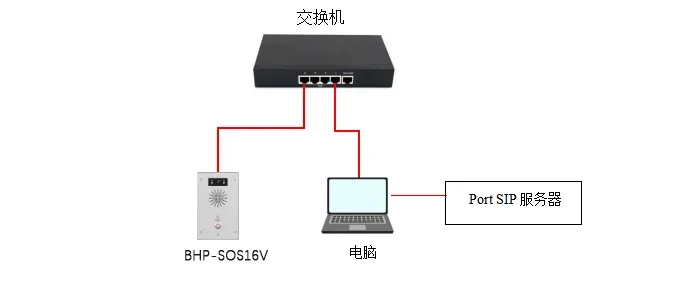
将 BHP-SOS16V 连接到交换机,将电脑连接到同一台交换机,并在电脑上安装 PortSIP Server。连接图如图 1 所示。

1.webp

                                                                                                           图 1 设备与电脑连接图

注册到 PortSIP 服务器

要将设备注册到 PortSIP Server,必须首先设置服务器环境。本指南以安装在 Windows 上的 PortSIP 服务器为例。

在服务器上创建分机

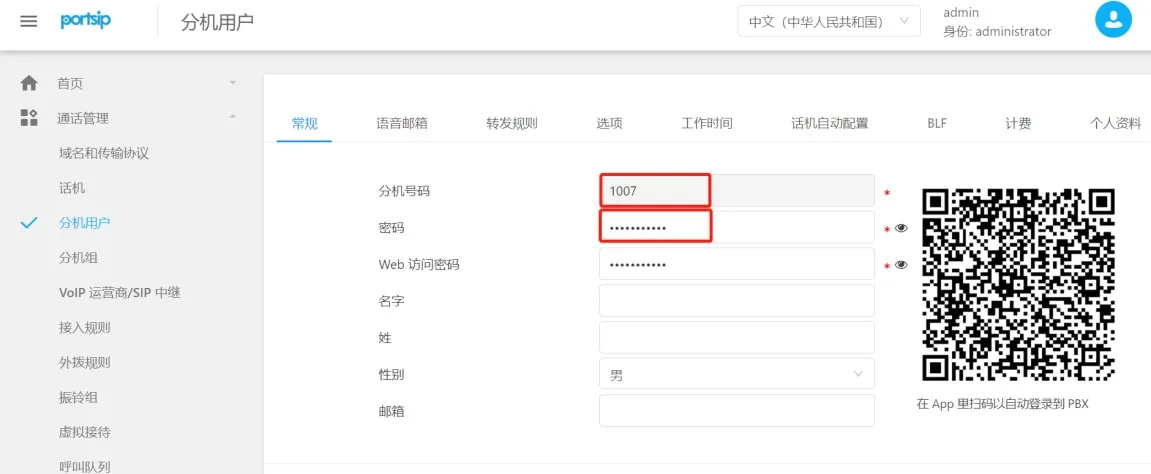
(1) 创建分机:登录服务器的 Web 界面,前往 Call ManagerExtensions — 点击 Add 创建新分机。
输入分机号码和密码以完成创建。
Add Extension Account

图 2 添加分机账号

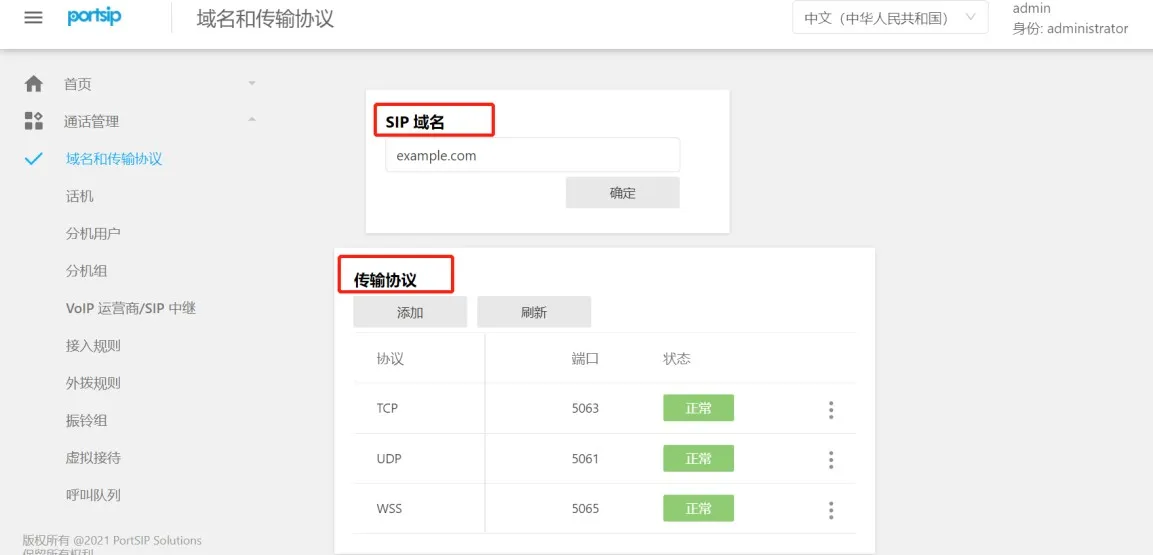
(2) 检查域名与传输协议:前往 Call ManagerDomains & Transports 查看 SIP 域名、传输协议和端口号,如图 3 所示。
View Server Domain and Transport Protocol

图 3 查看服务器域名与传输协议

将设备注册到服务器

在服务器上创建分机后,配置设备进行注册。步骤如下:
(1) 登录设备:在浏览器中输入设备的 IP 地址,使用用户名和密码登录(默认:admin/admin)。
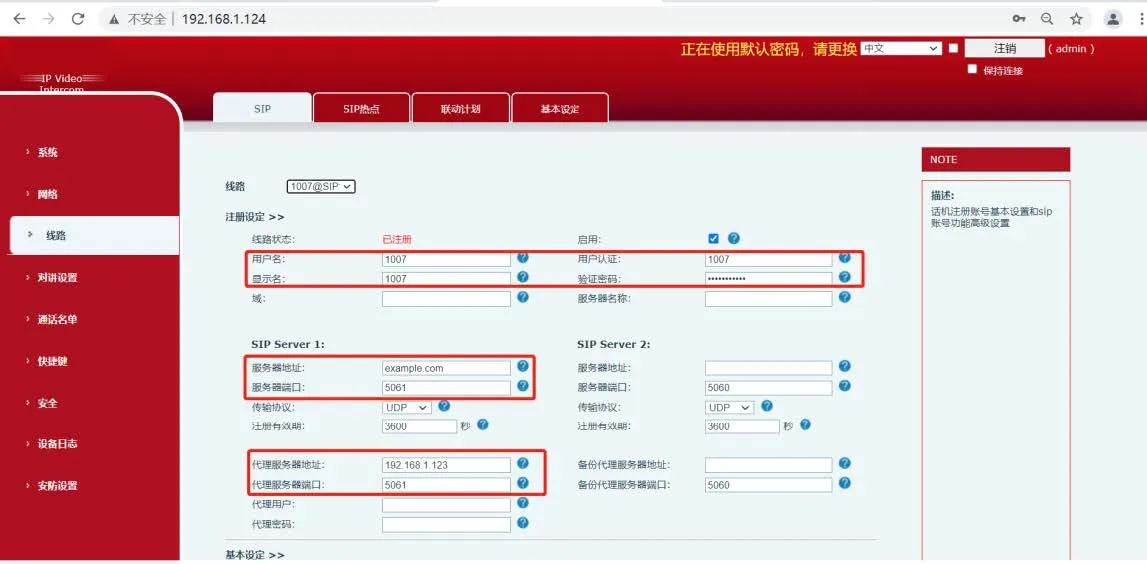
(2) 前往设备 Web 界面:LineSIPRegistration Settings,如图 4 所示进行配置:

  • ① 用户名、认证 ID、密码:使用在 PortSIP Server 上创建的分机号码和密码;

  • ② 服务器地址:输入 PortSIP 的 SIP 域名;

  • ③ 服务器端口与传输:输入端口和协议(以 UDP 为例);

  • ④ 代理服务器与端口:使用 PortSIP 电脑的静态 IP 和对应的端口。
SIP Registration Diagram

图 4 SIP 注册图

(3) 输入信息并确保网络连通后,设备的 线路状态 将变为 Registered,表示设备已成功注册到 SIP 服务器。

目录
客服 电话
We use cookie to improve your online experience. By continuing to browse this website, you agree to our use of cookie.

Cookies

This Cookie Policy explains how we use cookies and similar technologies when you access or use our website and related services. Please read this Policy together with our Terms and Conditions and Privacy Policy so that you understand how we collect, use, and protect information.

By continuing to access or use our Services, you acknowledge that cookies and similar technologies may be used as described in this Policy, subject to applicable law and your available choices.

Updates to This Cookie Policy

We may revise this Cookie Policy from time to time to reflect changes in legal requirements, technology, or our business practices. When we make updates, the revised version will be posted on this page and will become effective from the date of publication unless otherwise required by law.

Where required, we will provide additional notice or request your consent before applying material changes that affect your rights or choices.

What Are Cookies?

Cookies are small text files placed on your device when you visit a website or interact with certain online content. They help websites recognize your browser or device, remember your preferences, support essential functionality, and improve the overall user experience.

In this Cookie Policy, the term “cookies” also includes similar technologies such as pixels, tags, web beacons, and other tracking tools that perform comparable functions.

Why We Use Cookies

We use cookies to help our website function properly, remember user preferences, enhance website performance, understand how visitors interact with our pages, and support security, analytics, and marketing activities where permitted by law.

We use cookies to keep our website functional, secure, efficient, and more relevant to your browsing experience.

Categories of Cookies We Use

Strictly Necessary Cookies

These cookies are essential for the operation of the website and cannot be disabled in our systems where they are required to provide the service you request. They are typically set in response to actions such as setting privacy preferences, signing in, or submitting forms.

Without these cookies, certain parts of the website may not function correctly.

Functional Cookies

Functional cookies enable enhanced features and personalization, such as remembering your preferences, language settings, or previously selected options. These cookies may be set by us or by third-party providers whose services are integrated into our website.

If you disable these cookies, some services or features may not work as intended.

Performance and Analytics Cookies

These cookies help us understand how visitors use our website by collecting information such as traffic sources, page visits, navigation behavior, and general interaction patterns. In many cases, this information is aggregated and does not directly identify individual users.

We use this information to improve website performance, usability, and content relevance.

Targeting and Advertising Cookies

These cookies may be placed by our advertising or marketing partners to help deliver more relevant ads and measure the effectiveness of campaigns. They may use information about your browsing activity across different websites and services to build a profile of your interests.

These cookies generally do not store directly identifying personal information, but they may identify your browser or device.

First-Party and Third-Party Cookies

Some cookies are set directly by our website and are referred to as first-party cookies. Other cookies are set by third-party services, such as analytics providers, embedded content providers, or advertising partners, and are referred to as third-party cookies.

Third-party providers may use their own cookies in accordance with their own privacy and cookie policies.

Information Collected Through Cookies

Depending on the type of cookie used, the information collected may include browser type, device type, IP address, referring website, pages viewed, time spent on pages, clickstream behavior, and general usage patterns.

This information helps us maintain the website, improve performance, enhance security, and provide a better user experience.

Your Cookie Choices

You can control or disable cookies through your browser settings and, where available, through our cookie consent or preference management tools. Depending on your location, you may also have the right to accept or reject certain categories of cookies, especially those used for analytics, personalization, or advertising purposes.

Please note that blocking or deleting certain cookies may affect the availability, functionality, or performance of some parts of the website.

Restricting cookies may limit certain features and reduce the quality of your experience on the website.

Cookies in Mobile Applications

Where our mobile applications use cookie-like technologies, they are generally limited to those required for core functionality, security, and service delivery. Disabling these essential technologies may affect the normal operation of the application.

We do not use essential mobile application cookies to store unnecessary personal information.

How to Manage Cookies

Most web browsers allow you to manage cookies through browser settings. You can usually choose to block, delete, or receive alerts before cookies are stored. Because browser controls vary, please refer to your browser provider’s support documentation for details on how to manage cookie settings.

Contact Us

If you have any questions about this Cookie Policy or our use of cookies and similar technologies, please contact us at support@becke.cc .