
行业洞察
2026-06-23 16:51:24
统一通信系统部署Linux命令指南
一篇实用的解决方案文章,解释统一通信系统必备的Linux命令,包括IP配置、防火墙检查、抓包以及Asterisk、FreeSWITCH、SIP、语音和视频通信项目的故障排查。

贝克电信

统一通信系统部署Linux命令指南

大多数统一通信系统运行在基于Linux的服务器环境上。开源通信平台如Asterisk和FreeSWITCH通常部署在Linux上,许多项目环境仍使用CentOS或类CentOS服务器系统。对于从事SIP通信、语音网关、调度平台、视频通信、IP PBX系统和呼叫中心服务的工程师来说,掌握基本的Linux命令可以显著提高部署效率和故障排查准确性。

在实际的统一通信项目中,许多问题并非由通信应用本身引起,而可能源于错误的IP配置、不可达的路由、防火墙端口被阻止、网络链路不稳定,或信令包未能送达正确的服务。一套实用的Linux操作流程有助于实施团队快速检查服务器环境、调整网络参数、验证服务连通性,并收集证据以便进一步分析。
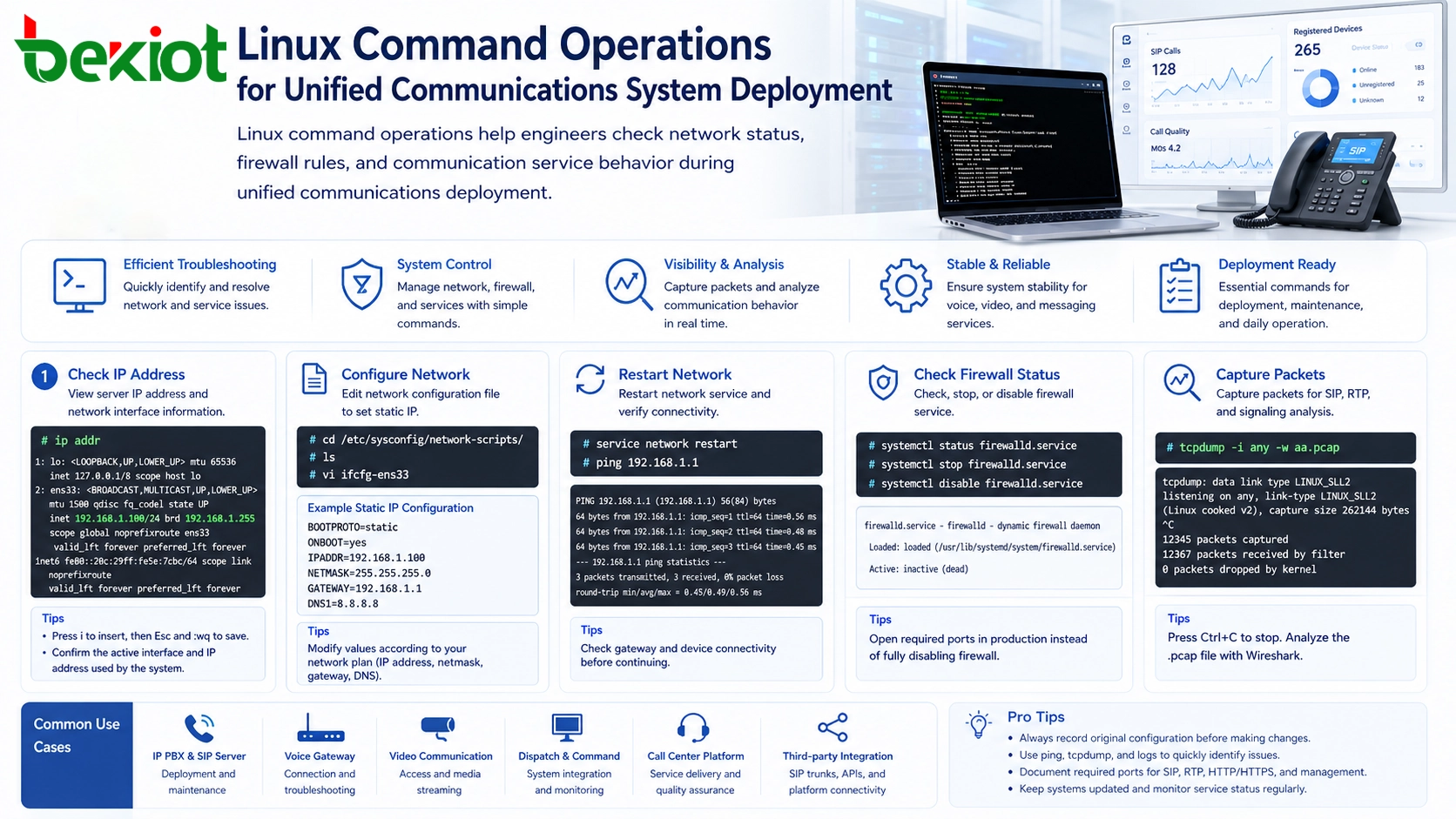
统一通信系统部署中的Linux命令操作
Linux命令操作帮助工程师在统一通信部署期间检查网络状态、防火墙规则和通信服务行为。

为什么服务器级操作很重要

统一通信平台通常依赖于稳定的IP网络、开放的服务端口和可靠的媒体传输。SIP信令、RTP语音流、视频媒体、Web管理界面、数据库服务和网关连接都需要正确的网络和系统配置。如果服务器IP地址错误、网关不可用或防火墙阻止了关键端口,用户可能会遇到注册失败、单向音频、呼叫失败、视频缺失或会议不稳定的情况。

图形化管理门户可以处理许多常规设置,但无法替代系统级检查。Linux命令让工程师能够直接查看真实的服务器状态,他们可以确认当前IP地址、进入网络配置目录、编辑接口参数、重启网络服务、检查防火墙状态,并抓取SIP或媒体分析所需的数据包。

这在项目交付期间尤其有用。工程师可以快速判断问题属于应用层、网络层、防火墙层还是设备互联层。同时,它还能帮助现场团队与研发工程师协作,通过提供清晰的配置细节和抓包文件,而不是模糊的问题描述。

检查服务器IP地址

通信项目中的第一个基本任务是确认服务器的IP地址。统一通信系统通常需要与SIP电话、网关、中继、调度台、录音服务器、管理客户端和第三方平台通信。如果IP地址不正确或使用了错误的网络接口,设备可能无法注册或连接。

以下命令可用于查看当前IP地址和网络接口信息:

# ip addr

此命令显示网络接口名称、IP地址、子网信息和链路状态。在部署环境中,工程师应检查服务器是否获得了预期的IP地址、正确的网卡是否激活,以及该地址是否属于规划的通信网段。

对于统一通信系统,IP确认不仅仅是网络步骤,它直接影响SIP注册地址、媒体协商、中继配置、设备接入和平台互联。

编辑网络配置文件

当需要静态IP地址时,工程师可能需要编辑网络配置文件。在许多类CentOS环境中,网络配置文件存储在以下目录:

# cd /etc/sysconfig/network-scripts/

进入目录后,工程师可以列出可用文件:

# ls

网卡配置文件可能类似于ifcfg-ens33ifcfg-eth0或其他名称,具体取决于服务器环境。应根据实际网络接口名称编辑正确的文件。

# vi ifcfg-ens33

vi编辑器中,按i进入插入模式并修改网络参数。典型的静态IP配置可能包括以下项目:

BOOTPROTO=static
ONBOOT=yes
IPADDR=XXX.XXX.XXX.XXX
NETMASK=XXX.XXX.XXX.XXX
GATEWAY=XXX.XXX.XXX.XXX
DNS1=XXX.XXX.XXX.XXX

编辑完成后,按Esc,然后输入:wq保存并退出。这些参数应根据实际项目网络规划填写,包括IP地址、子网掩码、网关和DNS服务器。

在通信项目中,通常建议为核心服务器、SIP平台、调度系统、媒体网关、录音服务器和集成节点规划静态IP。服务器IP地址变动容易破坏设备注册、中继路由、API回调以及平台互联。

重启网络服务

修改网络配置后,必须重启网络服务才能使新配置生效。在类CentOS系统中,常用以下命令:

# service network restart

重启后,工程师应验证新的IP地址是否已生效,以及服务器能否访问其他网络设备。ping命令是测试基本连通性的简单方法:

# ping 192.168.1.1

目标地址应根据实际网关、SIP服务器、网关设备、调度终端或平台地址进行更改。如果服务器无法ping通网关或关键服务设备,应在测试SIP呼叫、视频接入或平台集成之前解决该问题。

网络重启和连通性检查虽然简单但很重要。许多通信问题是由错误的网关设置、不正确的子网掩码、错误的网络接口或物理链路断开引起的。
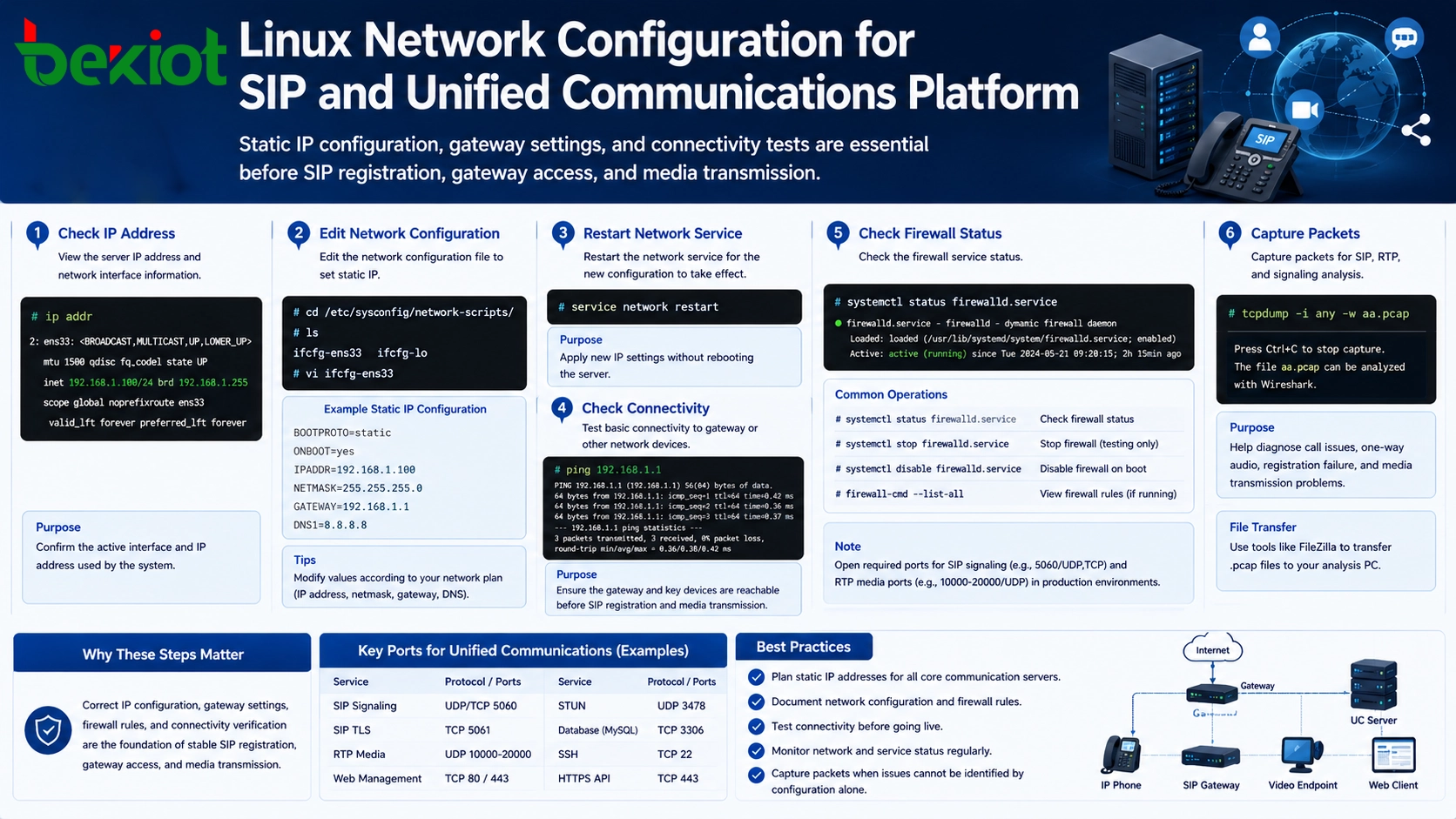
SIP和统一通信平台的Linux网络配置
在SIP注册、网关接入和媒体传输之前,静态IP配置、网关设置和连通性测试是必不可少的。

检查和管理防火墙状态

防火墙配置是导致通信故障的最常见原因之一。SIP平台、RTP媒体流、Web管理页面、视频服务和网关连接都需要特定端口可达。如果防火墙阻止了这些端口,用户可能会遇到注册失败、呼叫失败、单向音频、无视频或媒体传输不稳定的情况。

以下命令检查防火墙服务状态:

# systemctl status firewalld.service

如果结果显示active (running),表示防火墙当前已启用。在测试或故障排查期间,工程师可以临时停止防火墙,以确定被阻止的端口是否导致了问题。

# systemctl stop firewalld.service

停止防火墙后,再次检查状态:

# systemctl status firewalld.service

如果结果显示inactive (dead),表示防火墙已停止。要禁用防火墙在重启后自动启动,请使用:

# systemctl disable firewalld.service

对于生产环境,应谨慎规划防火墙处理。完全禁用防火墙可能对临时测试有用,但更好的长期方法是根据安全策略开放所需的服务端口。统一通信系统通常涉及SIP信令、RTP媒体端口、HTTPS管理、数据库访问、录音服务和API接口,因此端口规划应清晰记录。

使用抓包进行信令分析

抓包是统一通信项目中最重要的问题排查方法之一。当呼叫失败、无法打开视频、设备无法注册或语音变为单向时,抓包可以显示信令和媒体包是否真正到达服务器。

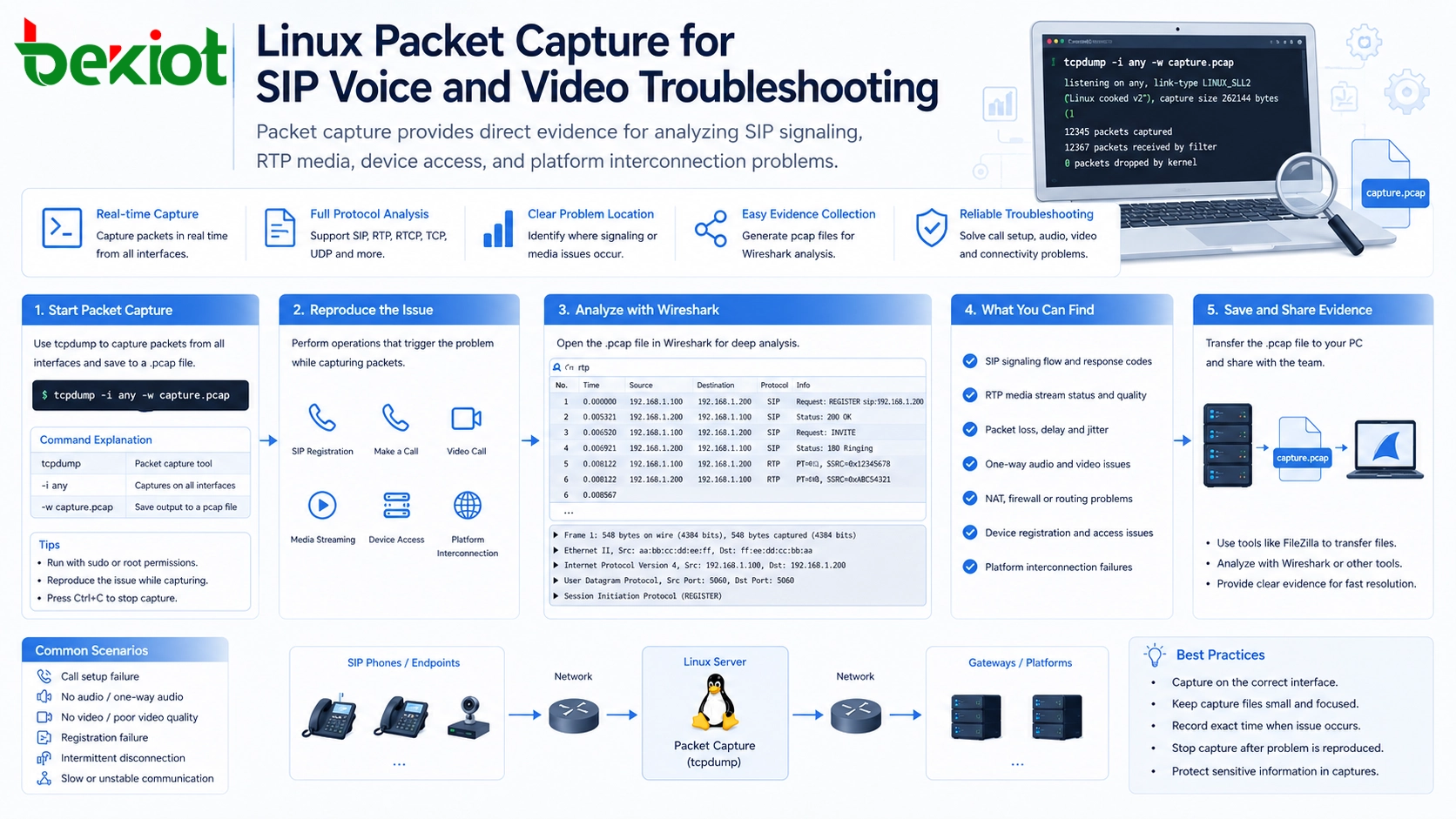
Linux服务器通常使用tcpdump来抓取IP包。以下命令从所有接口抓取数据包,并将结果保存为.pcap文件:

# tcpdump -i any -w aa.pcap

在此命令中,aa.pcap是生成的抓包文件名。文件名可以更改,但应保留.pcap扩展名以便后续分析。抓包开始后,工程师可以通过发起呼叫、注册设备、打开视频流或测试平台互联来重现问题。

当问题重现后,按Ctrl + C停止抓包。生成的.pcap文件随后可通过FileZilla等工具传输到电脑,并使用Wireshark或类似抓包分析软件进行分析。

抓包有助于确定问题发生的位置。例如,工程师可以检查SIP消息是否发送和接收、RTP媒体端口是否协商正确、远端设备是否响应,以及网络路径中是否存在丢包或路由问题。

这些命令如何支持项目交付

在统一通信部署中,Linux命令不应被视为孤立的技术技巧,它们构成了一套实用的现场工作流程。工程师首先确认服务器IP地址,然后验证网络配置,必要时重启服务,测试连通性,检查防火墙状态,最后在无法仅从配置判断问题时进行抓包。

此工作流程可用于许多通信场景,包括IP PBX部署、SIP中继接入、语音网关配置、调度系统实施、视频通信集成、呼叫中心平台交付,以及与第三方业务系统的互联。

这些命令的价值在于效率。它们帮助项目团队快速缩小故障范围。如果IP配置错误,应用层调试无法解决问题;如果防火墙阻止了媒体端口,更换SIP账号无法修复单向音频;如果数据包从未到达服务器,问题可能是路由、NAT、网关策略或网络访问控制,而不是通信平台本身。

构建运维检查清单

对于长期维护,组织应将这些命令转化为标准检查清单。上线前,团队应确认服务器IP地址、网关、DNS、网络可达性、防火墙策略、所需端口、服务启动状态和抓包方法。在故障排查期间,同样的检查清单可以帮助工程师避免遗漏基本问题。

  • 使用ip addr确认服务器IP和活动接口。

  • 在修改静态IP设置之前检查网络配置文件。

  • 更改IP参数后重启网络服务。

  • 使用ping确认与网关和设备的基本连通性。

  • 使用systemctl status firewalld.service检查防火墙状态。

  • 使用tcpdump收集SIP、RTP和视频故障排查的数据包证据。

  • 将抓包文件保存为.pcap格式以供Wireshark分析。

用于SIP语音和视频故障排查的Linux抓包
抓包为分析SIP信令、RTP媒体、设备接入和平台互联问题提供了直接证据。

安全和操作注意事项

虽然这些命令很有用,但应在适当的权限控制下使用。网络配置更改可能中断服务,防火墙更改可能影响系统安全,抓包文件可能包含IP地址、信令信息和通信元数据。因此,只有授权工程师才能在生成环境中执行这些操作。

在修改运行中的系统之前,最好记录原始配置。在停止防火墙进行测试时,应控制测试窗口,并最终恢复或适当调整安全策略。在收集抓包时,应安全地存储和传输文件。

可靠的统一通信解决方案需要应用层设计和系统层操作相结合。Linux命令技能有助于弥合通信软件、服务器基础设施、网络环境和现场故障排查之间的差距。

结论

统一通信系统高度依赖Linux服务器环境,尤其是当涉及Asterisk、FreeSWITCH、SIP网关、媒体服务和调度系统等平台时。基本的Linux命令可以大幅提高项目实施和故障排查效率。

命令如ip addrviservice network restartpingsystemctl status firewalld.servicetcpdump帮助工程师检查网络、修改IP参数、管理防火墙状态以及抓包进行深入分析。

对于SIP、语音、视频、呼叫中心和调度项目,这些Linux操作应成为标准部署和维护流程的一部分。它们有助于减少猜测、缩短故障排查时间,并为解决通信问题提供清晰的证据。

常见问题

现场工程师在通信项目中需要高级Linux知识吗?

不一定需要高级Linux管理知识,但工程师应了解用于IP检查、文件编辑、网络重启、防火墙检查和抓包的基本命令。这些技能通常足以解决常见的部署和故障排查问题。

在统一通信系统中是否应该始终关闭防火墙?

不应该。关闭防火墙有助于测试,但生产系统应使用规划好的安全策略。应根据实际系统设计开放所需的SIP、RTP、Web、API和管理端口。

当呼叫配置看起来正确时,为什么抓包还有用?

配置可能看起来正确,但数据包仍可能被阻止、路由错误、被NAT重写或被其他设备拒绝。抓包显示了网络上真实的信令和媒体行为,从而更容易定位故障。

这些命令可以同时用于语音和视频故障排查吗?

可以。相同的Linux检查流程可用于SIP语音、RTP媒体、视频流、网关接入、会议系统和平台互联。区别主要在于需要分析哪些端口和协议。

在更改服务器网络设置之前应准备什么?

工程师应记录原始IP地址、子网掩码、网关、DNS、接口名称和远程访问方法。这有助于防止意外失去连接,并在新配置不正确时方便回滚。
推荐产品
目录
客服 电话
We use cookie to improve your online experience. By continuing to browse this website, you agree to our use of cookie.

Cookies

This Cookie Policy explains how we use cookies and similar technologies when you access or use our website and related services. Please read this Policy together with our Terms and Conditions and Privacy Policy so that you understand how we collect, use, and protect information.

By continuing to access or use our Services, you acknowledge that cookies and similar technologies may be used as described in this Policy, subject to applicable law and your available choices.

Updates to This Cookie Policy

We may revise this Cookie Policy from time to time to reflect changes in legal requirements, technology, or our business practices. When we make updates, the revised version will be posted on this page and will become effective from the date of publication unless otherwise required by law.

Where required, we will provide additional notice or request your consent before applying material changes that affect your rights or choices.

What Are Cookies?

Cookies are small text files placed on your device when you visit a website or interact with certain online content. They help websites recognize your browser or device, remember your preferences, support essential functionality, and improve the overall user experience.

In this Cookie Policy, the term “cookies” also includes similar technologies such as pixels, tags, web beacons, and other tracking tools that perform comparable functions.

Why We Use Cookies

We use cookies to help our website function properly, remember user preferences, enhance website performance, understand how visitors interact with our pages, and support security, analytics, and marketing activities where permitted by law.

We use cookies to keep our website functional, secure, efficient, and more relevant to your browsing experience.

Categories of Cookies We Use

Strictly Necessary Cookies

These cookies are essential for the operation of the website and cannot be disabled in our systems where they are required to provide the service you request. They are typically set in response to actions such as setting privacy preferences, signing in, or submitting forms.

Without these cookies, certain parts of the website may not function correctly.

Functional Cookies

Functional cookies enable enhanced features and personalization, such as remembering your preferences, language settings, or previously selected options. These cookies may be set by us or by third-party providers whose services are integrated into our website.

If you disable these cookies, some services or features may not work as intended.

Performance and Analytics Cookies

These cookies help us understand how visitors use our website by collecting information such as traffic sources, page visits, navigation behavior, and general interaction patterns. In many cases, this information is aggregated and does not directly identify individual users.

We use this information to improve website performance, usability, and content relevance.

Targeting and Advertising Cookies

These cookies may be placed by our advertising or marketing partners to help deliver more relevant ads and measure the effectiveness of campaigns. They may use information about your browsing activity across different websites and services to build a profile of your interests.

These cookies generally do not store directly identifying personal information, but they may identify your browser or device.

First-Party and Third-Party Cookies

Some cookies are set directly by our website and are referred to as first-party cookies. Other cookies are set by third-party services, such as analytics providers, embedded content providers, or advertising partners, and are referred to as third-party cookies.

Third-party providers may use their own cookies in accordance with their own privacy and cookie policies.

Information Collected Through Cookies

Depending on the type of cookie used, the information collected may include browser type, device type, IP address, referring website, pages viewed, time spent on pages, clickstream behavior, and general usage patterns.

This information helps us maintain the website, improve performance, enhance security, and provide a better user experience.

Your Cookie Choices

You can control or disable cookies through your browser settings and, where available, through our cookie consent or preference management tools. Depending on your location, you may also have the right to accept or reject certain categories of cookies, especially those used for analytics, personalization, or advertising purposes.

Please note that blocking or deleting certain cookies may affect the availability, functionality, or performance of some parts of the website.

Restricting cookies may limit certain features and reduce the quality of your experience on the website.

Cookies in Mobile Applications

Where our mobile applications use cookie-like technologies, they are generally limited to those required for core functionality, security, and service delivery. Disabling these essential technologies may affect the normal operation of the application.

We do not use essential mobile application cookies to store unnecessary personal information.

How to Manage Cookies

Most web browsers allow you to manage cookies through browser settings. You can usually choose to block, delete, or receive alerts before cookies are stored. Because browser controls vary, please refer to your browser provider’s support documentation for details on how to manage cookie settings.

Contact Us

If you have any questions about this Cookie Policy or our use of cookies and similar technologies, please contact us at support@becke.cc .