

A two-person call is simple: one endpoint sends voice or video to another endpoint, and both sides exchange media in real time. The situation changes when a third, fourth, or hundredth participant joins. The system must decide how media is mixed, routed, encoded, synchronized, recorded, secured, and controlled. That is why multi-party communication is not only a user-facing call feature; it is also a media architecture problem.
The demand for this capability has expanded from office conference rooms to cloud meetings, contact centers, emergency command, telemedicine, online education, dispatch coordination, remote maintenance, enterprise collaboration, and mobile-first work. Users expect one-click joining, clear audio, stable video, screen sharing, host control, recording, and compatibility across phones, browsers, apps, and SIP devices. Behind that simple experience, the platform must balance participant scale, quality, latency, device resources, network conditions, and cost.
From Simple Conference Feature to Communication Infrastructure
In earlier enterprise phone systems, group calling was often treated as a conference bridge feature. A few users could join the same audio session through a PBX, a hardware bridge, or a service number. The focus was mainly voice mixing and call control.
Modern deployments are broader. A meeting may include PSTN dial-in users, SIP phones, browser clients, mobile apps, room systems, remote workers, guests, supervisors, and recording services. It may also require video layout, screen sharing, live captions, chat, identity verification, waiting rooms, host permissions, and integration with calendars or workflow platforms.
This shift explains why participant limits vary so widely. A desk phone may support a small local conference. A PBX bridge may support dozens. A cloud meeting platform may support hundreds or thousands depending on whether users are interactive participants, listen-only attendees, webinar viewers, or broadcast recipients.
What Actually Limits Participant Count?
Participant limits are shaped by several layers at once. The first layer is media processing. If the system mixes audio or transcodes video centrally, the server must process many media streams. The second layer is bandwidth. Each participant may send and receive audio, video, or shared content. The third layer is signaling and control. Joining, leaving, muting, layout changes, recording, and role control all create system events.
The fourth layer is endpoint capability. A small embedded terminal, desk phone, browser tab, mobile device, and conference room appliance do not have the same CPU, memory, microphone, speaker, camera, or codec capability. The fifth layer is service policy. Vendors and administrators may limit participant count by license, meeting type, security level, quality profile, or subscription plan.
For this reason, the number shown in a product document is not always the number that should be used in design. A platform may technically allow 200 participants, but the practical limit for high-quality interactive video with recording and screen sharing may be lower under certain network conditions.
Audio-Only Sessions
Audio-only group calls generally support more participants than video calls because the bitrate and processing load are lower. Audio mixing can combine multiple speakers into a single stream for each listener, or the system can select active speakers and suppress background noise.
However, audio sessions still have limits. Echo, noise, talk overlap, late packet arrival, codec mismatch, and poor microphone discipline become more obvious as the group grows. A meeting with ten well-managed speakers may sound better than a meeting with fifty unmuted participants in noisy locations.
For large audio meetings, host controls such as mute all, raise hand, speaker queue, listen-only mode, and moderated speaking are important. The technical limit is only one part of the real participant limit; human conversation management matters as well.
Video Sessions
Video adds much more complexity. Each participant may send camera video and receive one or more video streams. If the system sends every participant’s full video to every other participant, bandwidth and processing requirements grow quickly. Modern systems therefore use selective forwarding, active speaker switching, simulcast, scalable video coding, layout optimization, and adaptive bitrate control.
Participant count depends on camera resolution, frame rate, codec efficiency, network quality, endpoint CPU, server architecture, and layout requirements. A gallery view with many video tiles is more demanding than a session where only the active speaker is shown.
Video meetings also require stronger user experience design. When hundreds of users join, most should not transmit camera video continuously. Large events often separate speakers, panelists, moderators, and viewers to preserve quality and control.
Bridge-Based Implementation
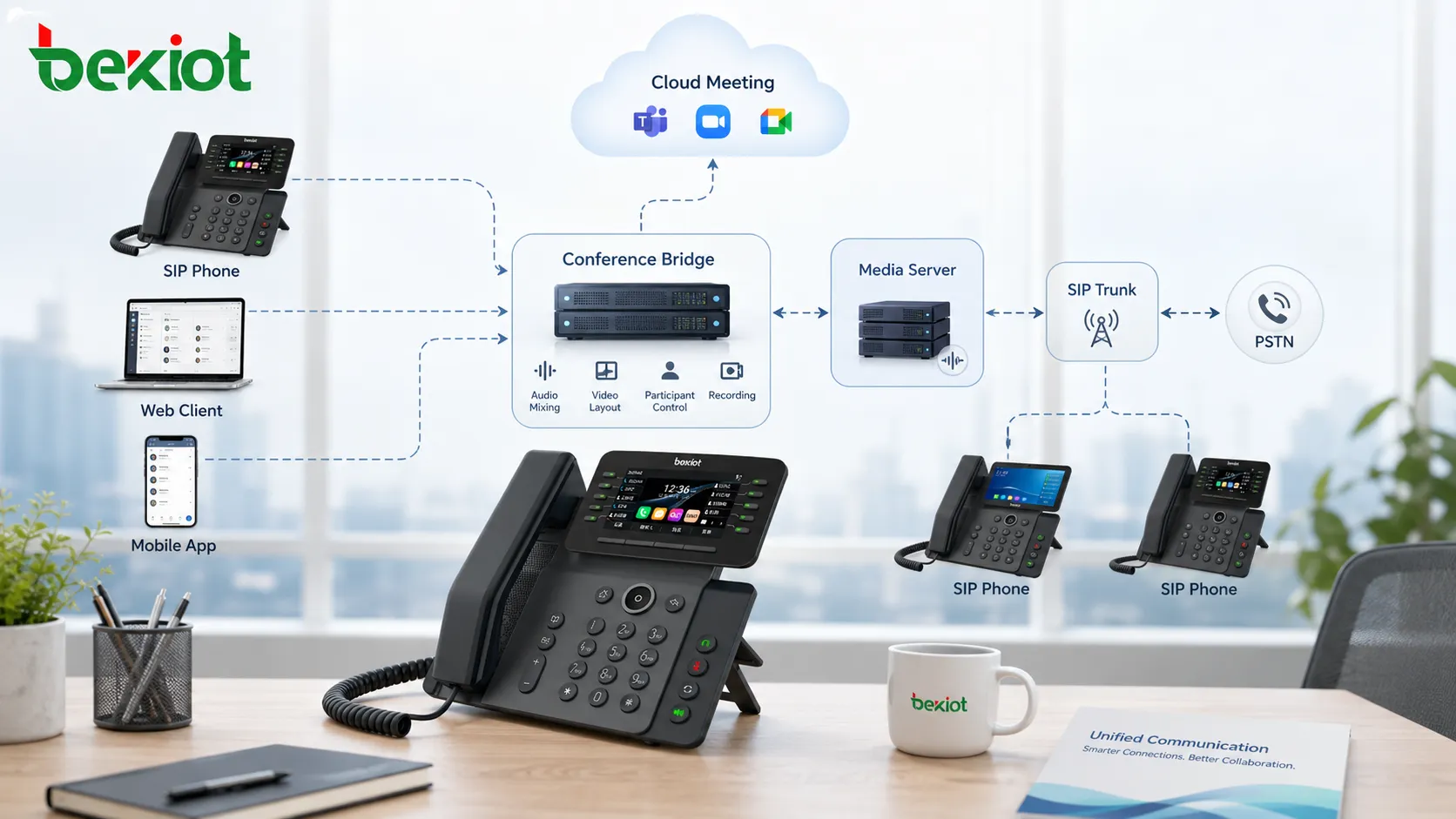
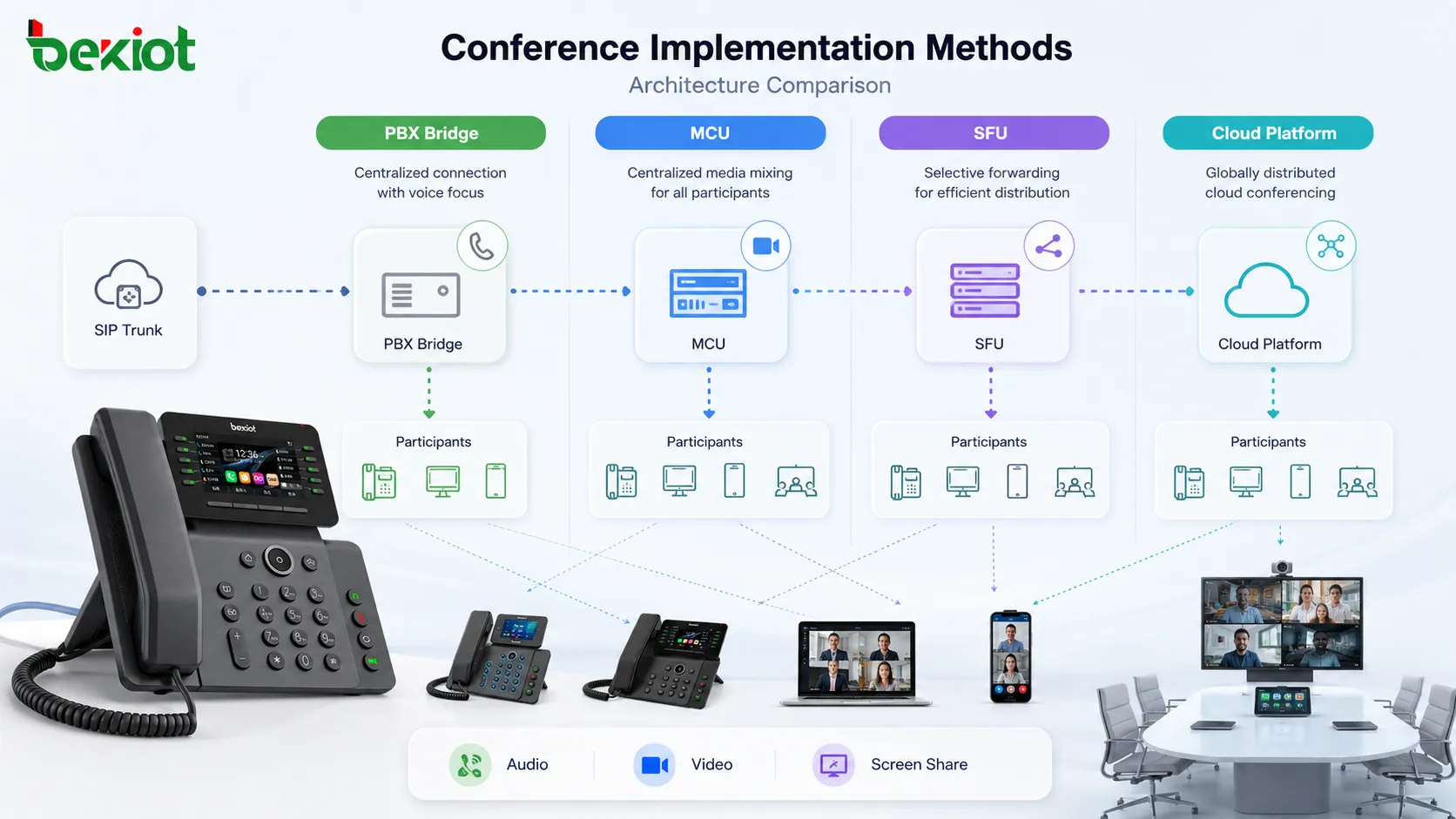
A conference bridge is a central point that receives media from participants and sends back mixed or selected media. In traditional telephony, the bridge often mixes audio streams so that each participant hears the group. In enterprise PBX systems, this may be built into the server or provided by a dedicated conferencing module.
The bridge model is easy to understand and works well for voice. The bridge manages who is in the conference, who is muted, who is speaking, and how audio is combined. It also supports recording, announcements, PIN entry, and dial-in access.
The challenge is scalability. As more participants join, the bridge must process more media. If video is also mixed centrally, the resource cost rises sharply. Large deployments may need distributed media servers or cloud scaling.
PBX and SIP-Based Methods
Many enterprise systems use SIP signaling to establish and manage calls. Multi-party sessions may be created through local conference features on an endpoint, PBX-hosted conference rooms, ad hoc call merge, conference extension numbers, or SIP application servers.
A local endpoint conference is simple but limited because the phone or softphone must handle multiple call legs. A PBX-hosted conference is more scalable because the server manages the media. A conference room number allows users to dial into a shared space. Ad hoc conference features allow a user to add participants during an active call.
SIP-based implementation must handle signaling correctly. Hold, re-INVITE, REFER, conference focus, media negotiation, codec support, DTMF, early media, and recording can all affect the final experience. Interoperability testing is important when phones, PBX systems, gateways, and trunks come from different vendors.
MCU Architecture
A Multipoint Control Unit, or MCU, receives audio and video from participants, decodes streams, mixes or composites them, and sends a processed stream back to each participant. This approach gives strong central control over layout and media format.
MCU architecture is useful when endpoints have limited capability or when a consistent video layout is required. The server can create a single composed video stream for each participant, reducing endpoint complexity.
The disadvantage is server resource consumption. Decoding, mixing, and re-encoding video for many users requires significant CPU or hardware acceleration. For very large meetings, pure MCU design can become costly unless carefully scaled.
SFU Architecture
A Selective Forwarding Unit, or SFU, receives media streams and forwards selected streams to participants without fully mixing and re-encoding every stream. This is common in WebRTC-based meeting platforms because it can scale more efficiently than full video mixing.
The SFU can choose which streams to send based on active speaker, layout, bandwidth, subscription request, device capability, or network condition. It may forward different quality layers to different participants if simulcast or scalable video coding is used.
The advantage is scalability and lower server processing compared with full video composition. The trade-off is that endpoints may need to decode multiple streams and handle layout locally. This can be demanding for low-power devices if too many video streams are displayed.
Cloud Meeting Platforms
Cloud platforms have become a major direction because they can scale media resources dynamically, connect users from different networks, and support browser or app-based access. They often combine signaling services, media routing, recording, identity management, chat, calendar integration, analytics, and administration portals.
Cloud systems usually support a larger range of meeting types. A small team meeting may be fully interactive. A training session may allow limited speakers and many viewers. A webinar may separate host, panelist, and attendee roles. A broadcast may move viewers to streaming infrastructure rather than treating all of them as equal conference participants.
This distinction is important. A platform may support thousands of viewers, but that does not mean thousands of fully interactive audio-video participants. Interactive capacity and audience capacity should be evaluated separately.
Participant Limit Categories
| Scenario Type | Typical Interaction Pattern | Main Limit Factor | Design Priority |
|---|---|---|---|
| Small Team Call | Everyone can speak and join video | Endpoint CPU, echo control, user discipline | Natural conversation and low latency |
| Department Meeting | Many listeners, several active speakers | Server media routing and bandwidth | Stable audio, active speaker control, recording |
| Training Session | Instructor-led, controlled participation | Role management and content sharing | Screen quality, Q&A, mute control |
| Webinar | Panelists speak, audience mostly listens | Audience distribution and moderation | Scale, registration, attendee control |
| Emergency Coordination | Priority speakers and operational groups | Reliability, network resilience, permissions | Fast joining, command clarity, recording |
Codec and Media Quality
Codec selection affects capacity and quality. Efficient codecs reduce bandwidth while preserving acceptable audio or video quality. However, codec support must be consistent across endpoints and servers. Transcoding can solve compatibility problems but increases server load and latency.
For audio, intelligibility is usually more important than high-fidelity sound. Echo cancellation, noise suppression, packet loss concealment, and gain control can strongly affect the user experience. For video, resolution and frame rate should match the meeting purpose. A face-to-face discussion may not need the same video profile as a design review or medical consultation.
Quality settings should be adaptive when possible. Network conditions vary, especially for remote users, mobile users, and participants behind congested Wi-Fi or cellular networks.
Bandwidth Planning
Bandwidth planning is essential for large sessions. Each participant needs enough upstream bandwidth to send media and enough downstream bandwidth to receive media. The required amount depends on audio-only or video mode, resolution, screen sharing, number of visible streams, codec, and adaptive bitrate behavior.
Office networks should consider aggregate traffic. Ten users joining a cloud meeting from the same office may generate more internet load than expected. A conference room system may consume less aggregate bandwidth than many individual laptops in the same room.
For critical environments, network teams should use QoS, traffic monitoring, firewall capacity planning, and backup links. A multi-party session may fail not because the meeting platform is weak, but because the local network path is congested.
Latency and Conversation Flow
Latency affects how natural the conversation feels. In small interactive calls, high delay causes people to talk over each other. In large meetings with controlled speakers, slightly higher delay may be acceptable. In emergency operations, dispatch coordination, or technical troubleshooting, delay can reduce command efficiency.
Media path design affects latency. Direct peer-to-peer media may be low-latency for small groups, but it becomes difficult to scale. Central media servers add routing control but may introduce additional delay. Cloud regions, VPN paths, satellite links, and transcoding can also increase latency.
Designers should place media resources near users when possible and avoid unnecessary media hairpinning through distant networks.
Role Control and Meeting Governance
As participant count increases, governance becomes as important as media technology. Host, co-host, moderator, presenter, attendee, listener, and supervisor roles define what each participant can do.
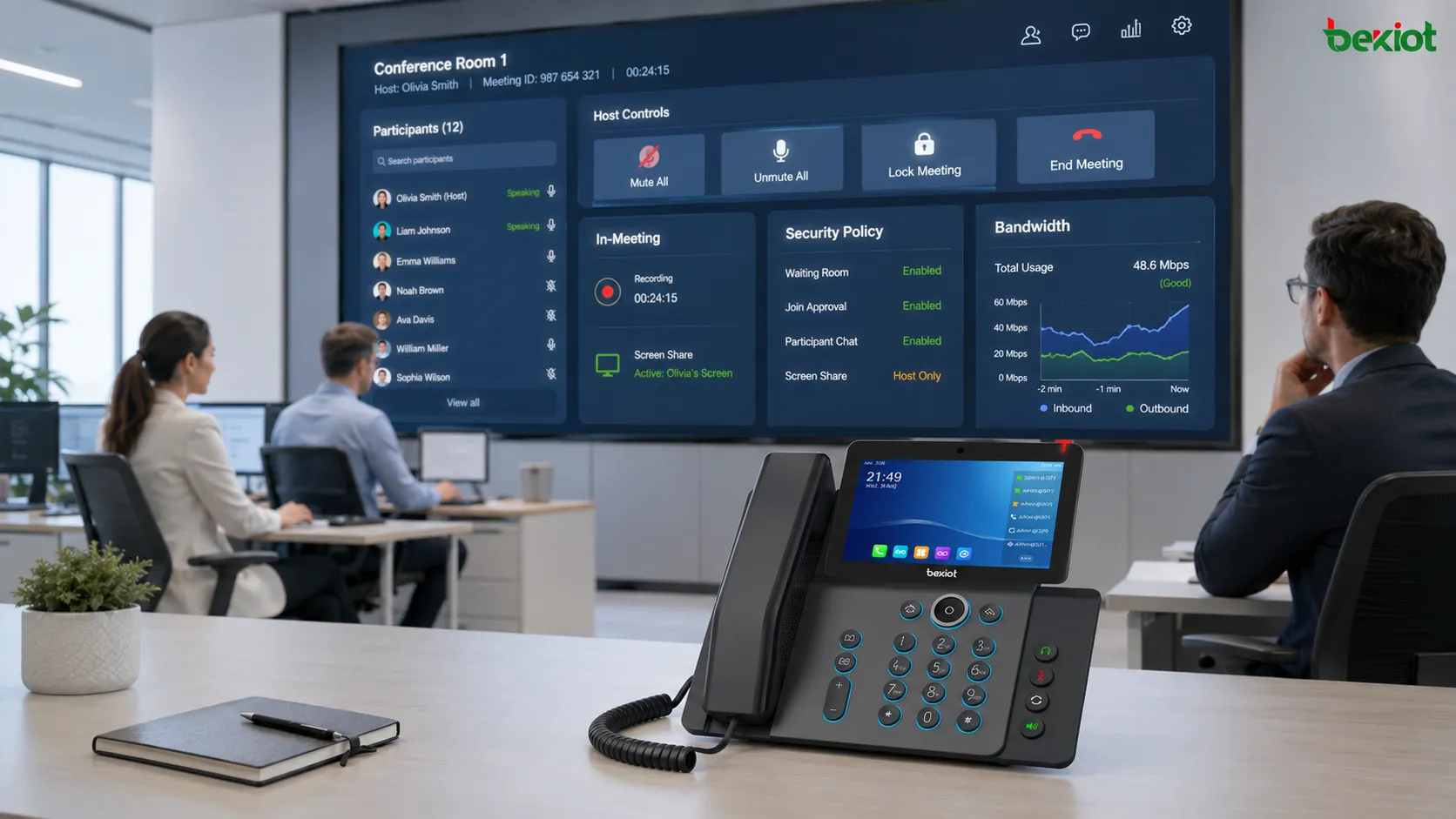
Functions such as mute all, lock meeting, waiting room, admit participant, remove participant, disable camera, control screen sharing, assign presenter, and manage questions protect the quality of large sessions. Without these controls, a large meeting can become chaotic even if the network and server capacity are sufficient.
For enterprise and public scenarios, role design should be part of policy. Not every participant should have permission to invite others, record, share screen, or unmute at any time.
Security and Privacy
Group communication can expose sensitive information if access is not controlled. Meeting links, dial-in PINs, guest access, recording permissions, screen sharing, chat logs, and participant identity all require attention.
Security measures may include authenticated joining, waiting rooms, host approval, encrypted media, restricted dial-in, domain-based access, meeting passwords, role-based controls, audit logs, and recording access restrictions.
Privacy is also important. A large session may include customers, partners, employees, contractors, or public attendees. The platform should make recording, transcription, and participant visibility rules clear.
Recording and Compliance
Recording is common in training, customer support, healthcare, public service, legal, financial, and emergency coordination. The system may record audio, video, screen sharing, chat, participant list, timestamps, and host actions.
Recording large sessions requires storage planning and retention policy. It also requires clear consent and access control. A meeting recording may contain sensitive information that should not be publicly shared or stored indefinitely.
From an implementation perspective, recording can be local, server-side, or cloud-based. Server-side recording is easier to standardize, while local recording may depend on user behavior and device settings.
Integration With Business Systems
Modern group calling is often integrated with calendars, customer relationship management, ticketing tools, learning platforms, dispatch systems, healthcare systems, and workflow applications. Integration reduces manual steps and helps users join the correct session with the correct context.
For example, a support escalation can create a conference with a customer, support engineer, and supervisor. A telemedicine appointment can connect patient, doctor, and interpreter. A field maintenance incident can bring together control room staff, remote experts, and onsite technicians.
Integration should preserve security. Automatically generated meeting links should not be exposed to unauthorized users. Meeting records should match the business record without leaking private information.
Use in Enterprise Collaboration
Enterprise collaboration is one of the strongest use cases. Teams use group calls for daily meetings, project reviews, training, interviews, management communication, and cross-branch coordination.
The main design requirement is convenience. Users expect quick joining, contact directory access, calendar scheduling, screen sharing, recording, and stable audio. Participant limits should match typical meeting types rather than only rare maximum-scale events.
Organizations should also define meeting culture. Good technology cannot fully compensate for poor microphone discipline, unclear agenda, unnecessary attendees, or uncontrolled screen sharing.
Use in Contact Centers and Support
Support environments use multi-party sessions for escalation, supervisor assistance, expert consultation, customer handoff, and technical troubleshooting. A frontline agent may bring in a specialist while staying on the call to preserve context.
Participant limits are usually modest in this scenario, but control and recording are important. The system should show who joined, when they joined, whether the customer was placed on hold, and whether the interaction was recorded.
For high-quality support, the platform should make joining fast. A customer should not wait too long while an agent tries to add another party.
Use in Healthcare and Remote Consultation
Healthcare communication may involve doctors, nurses, specialists, patients, family members, interpreters, and administrative staff. Group calling can support remote consultation, triage, case review, care coordination, and follow-up.
Security and privacy requirements are especially important. Access control, recording policy, participant identity, consent, and data handling must be designed carefully.
Video quality may matter more in some medical contexts, while audio clarity and reliability may be enough for others. Participant limit planning should follow clinical workflow, not only general conferencing capacity.
Use in Education and Training
Education and training scenarios may involve instructors, students, guest speakers, moderators, and observers. Group sessions may include lecture mode, discussion mode, breakout sessions, screen sharing, polls, and recorded lessons.
The participant limit depends on teaching style. A small seminar needs interactive participation. A large lecture needs controlled speaking and content delivery. A public webinar needs attendee management and Q&A rather than open conversation.
Platforms should support role separation so instructors can manage speaking rights, recordings, screen sharing, and participant behavior.
Use in Emergency and Field Operations
Emergency response, transportation, utilities, industrial maintenance, and field operations often require rapid multi-party coordination. A session may include control room staff, field workers, supervisors, remote experts, and external agencies.
The design priority is reliability and clarity. Participants may join from mobile networks, radio gateways, dispatch consoles, satellite links, or rugged devices. The system should support fast joining, priority users, recording, and fallback paths.
For these scenarios, the practical participant limit should be tested under realistic network conditions. A platform that works well in an office may behave differently in a disaster area or remote site.
Hybrid PSTN, SIP, and WebRTC Access
Many deployments need mixed access. Some users join from phones through PSTN or SIP. Others join from browsers through WebRTC. Some use mobile apps or conference room systems. A mixed architecture improves accessibility but also increases complexity.
Audio levels, codec compatibility, DTMF support, caller identity, mute control, recording, and transfer behavior may differ by access method. PSTN users may not support the same interactive controls as app users. Browser users may depend on local permissions for microphone and camera.
Implementation should define what each access type can do. The meeting should remain usable even when not every participant has the same client capability.
Local, Private, and Cloud Deployment
Local deployment gives more control over data, network path, and integration with internal systems. It may be preferred for private networks, regulated environments, control rooms, or sites with limited internet access. However, it requires server capacity, maintenance, redundancy, upgrades, and skilled administration.
Cloud deployment offers easier scaling, external access, faster feature updates, and reduced local infrastructure burden. It is suitable for distributed organizations and public internet participation. However, it depends on provider availability, internet reachability, data policy, and subscription model.
Private cloud or hybrid deployment may combine both approaches. Sensitive internal traffic can remain controlled while external users join through managed access points.
Implementation Checklist
Start by defining meeting types. Small interactive calls, support escalation, training sessions, webinars, emergency coordination, and executive meetings have different requirements.
Then define target participant counts for each type. Avoid using a single maximum number for all scenarios. Separate active speakers, video participants, listen-only attendees, dial-in users, and viewers.
Next, plan media architecture. Decide whether the system uses PBX bridge, MCU, SFU, cloud media service, local server, or hybrid routing. Confirm audio and video codecs, recording, screen sharing, host controls, and security model.
Finally, test under realistic conditions. Include low-bandwidth users, mobile users, VPN users, external guests, PSTN dial-in, recording, screen sharing, and high participant count. Testing only with a few office users does not prove large-session readiness.
Common Design Mistakes
One mistake is confusing attendee count with interactive participant count. A platform may support many viewers but far fewer active speakers with video.
Another mistake is ignoring local network capacity. Even if the cloud service is strong, a branch office internet link may not support many simultaneous video users.
A third mistake is leaving meetings unmanaged. Without host controls, large calls can suffer from open microphones, background noise, accidental screen sharing, and unauthorized access.
A fourth mistake is assuming all endpoints behave the same. Phones, browsers, mobile apps, SIP room systems, and PSTN participants may support different features.
A fifth mistake is failing to define recording and retention rules before use. Recordings can create compliance and privacy risks if not managed properly.
Industry Trend Outlook
The industry is moving toward more integrated and flexible group communication. WebRTC makes browser-based joining easier. Cloud media platforms make scaling more accessible. AI features are being added for transcription, summaries, noise suppression, speaker identification, translation, and meeting analytics.
At the same time, organizations are paying more attention to security, data sovereignty, interoperability, and user experience. The future is not only larger meetings; it is smarter session control, better media adaptation, and tighter integration with business workflows.
The most practical direction is scenario-based design. Instead of asking only how many people can join, organizations should ask who needs to speak, who only needs to listen, what quality is required, what security policy applies, and how the session supports the real work process.
Multi-party calling works best when participant limits are planned according to media architecture, network capacity, endpoint capability, meeting role design, and the real communication purpose rather than a single advertised maximum number.
FAQ
Why does audio usually scale better than video?
Audio needs much less bandwidth and processing power than video. Video requires more encoding, decoding, layout control, and downstream bandwidth, especially when many cameras are active.
Can PSTN users join the same session as app users?
Yes, if the platform supports dial-in or gateway access. However, PSTN users may have fewer controls and different audio behavior compared with app or browser users.
Why does quality drop when many people turn on cameras?
More active video streams increase bandwidth, server routing load, and endpoint decoding work. The system may lower resolution, reduce frame rate, or switch to active-speaker mode.
Is a webinar the same as an interactive conference?
No. A webinar usually separates speakers from viewers. This allows larger audience scale because most attendees do not send audio or video continuously.
What should be tested before a large session?
Test joining methods, host controls, mute behavior, recording, screen sharing, dial-in access, bandwidth use, external guest access, and performance with the expected number of participants.